Affichage des articles dont le libellé est java project example. Afficher tous les articles

JAVA Hotel Management System Source Code

Hotel Reservation Management System Source Code Using JAVA NetBeans And MySQL Database

JAVA Hotel Management System Project

in this java complete project tutorial we will see how to create a hotel reservation management system in java programming language with mysql database.

goals of this project:
- give students / curious persons an example so they can learn from it.
- helping people create their first project. 
- sharing knowledge with others.

tools:
- java programming language.
- netbeans ide 8.2.
- mysql database.
- phpmyadmin.
- xampp server.

Watch This Project Demo And Tutorials Serie


if you want the source code click on the download button below


1 - The Database Schema

the mysql database will contains 4 tables:
1 - table users : to store the users usernames and passwords and allow them to login.
2 - table clients: to store and manage the hotel clients data.
3 - table room's types: to store the hotel rooms categories ( single, double, family, suite ).
4 - table rooms: to store and manage the hotel rooms data.
4 - table reservations: to store and manage the hotel rooms reservations data.

2 - The Hotel System Login Form

the login form will allow the Users to login into the application Main Form.
the user need to enter his username and password before clicking the login button.

java hotel management system - login form

if the user enter wrong username or password or let any one of this two fields empty an error message will show up telling him what's the problem.

java hotel management system - login form - enter username

java hotel management system - login form - enter password

java hotel management system - login form - wrong username or password

and if everything is ok, when you click on the login button the main hotel system form will show up and the login form will close it self.


3 - The Hotel System Main Form

after the user successfully login, he will see this simple form with a menu using jmenu swing.

java hotel management system - main form


and he can select where he want to go.
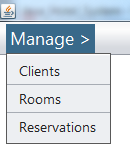
java hotel management system - main form - menu


3 - The Hotel System Manage Clients Form


when you select "Clients" form the main form menu, the ManageClientsForm will show up


java hotel management system - manage clients form


- when this form load all clients will be displayed into a jtable.

- to add a new client enter his data and click on "Add New Client" button.

- to edit a client you need to select him first from the jtable and enter the his new data.

- when you want to delete a product just select the product you want to remove and click on the "Remove" button.
- when you Edit or Remove a CLIENT click on the "Refresh" button to see the new results in the jtable.

5 - The Hotel System Manage Rooms Form


here the user can add a new room to the hotel system. when you add a new room you need to select the type of room (single, double, family, suite).

and like the client form you can view all rooms in a datagridview and add, edit, remove the selecte one + a combobx populated with all room's categories.

java hotel management system - manage rooms form

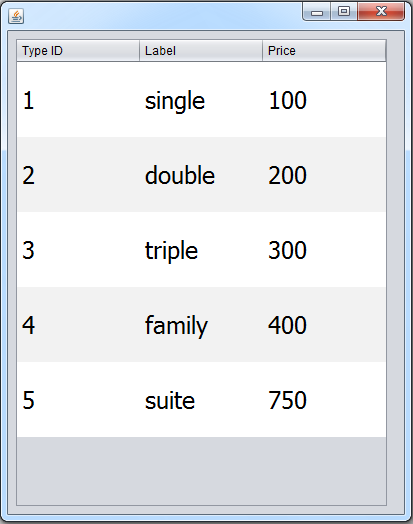
i you click on the show types button this form will show up with all the room's types available in this hotel managemnt system.

Note: there is no form to mange room's types, if you want to add, edit, delete a category you can do that directly from the database.

java hotel management system - manage rooms form - rooms categories

6 - The Hotel System Manage Reservations Form


This form allow the user to manage the clients room reservations.

to create a reservation you need: 1) enter the reservation id, 2) select the client who will reserve, 3) you need to select the room where the client will stay.

when you add a new reservation the system will check:

- if the user enter all required informations.
- if the user enter a date in that is equal or come after the current day date.
- if the user enter a date out that is equal or come after the date in.


java hotel management system - manage reservations form

C# Students Information System Source Code

Students Information Management System Source Code Using C# And MySQL Database

Students Information Management System Source Code In C#

in this c# project demo you will see what you can do with this students information  management system project build with csharp and a mysql database.

goals of this project:
- give students / curious persons an example so they can learn from.
- helping people create their first project. 
- sharing knowledge with others.


tools:
- c# programming language.
- visual studio express 2013.
- mysql database
- canva.com for images
- flatuicolorpicker.com for colors
- text file ( to export data )

Watch This Full Demo


if you want the source code click on the download button below


1 - Login Form

the login form allow the users to login into the application main form

C# Students Information System Source Code - login form

if the user enter a wrong username or password a message will show up

C# Students Information System Source Code - login form error

and when the user enter correct username and password


when you click on the login button the main form will show up and the login form will close it self.


2 - Main Form

the main form contain 3 tabs, one for the students, the second for the courses, and the last one for the scores.

3 - Student Section


on the student section you can add, edit, remove, and more.


C# Students Information System Source Code - main form - students
Students

-> Add Student Form

this form allow you to insert a new student with data verification before the insert

C# Students Information System Source Code - add student


-> Students List Form


this form contain a datagridveiw populated with all the students in the database, when you double click on a datagridview row -> the selected will be displayed on a new form to edit / remove student,
and you can click on the refresh button to display the edited data.


C# Students Information System Source Code - students list


-> Update Delete Student Form

you can access to this form by clicking on the "Edit / Remove" in the top menu, or by double clicking on a student in the students list form.
in this form you can:
- search student by id.
- remove student.
- edit student data.


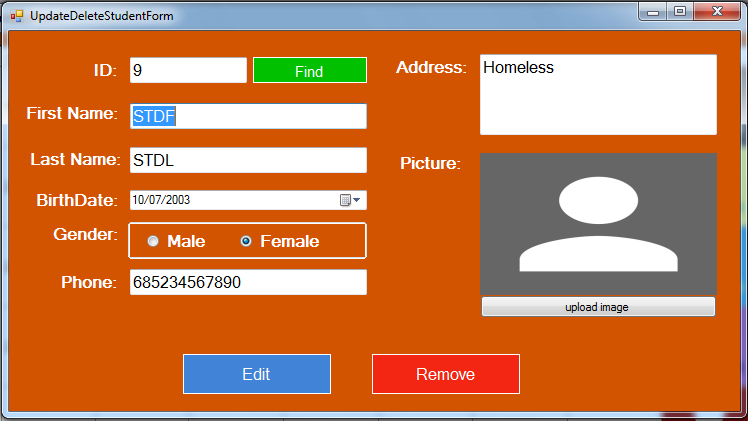
C# Students Information System Source Code - edit, remove student


-> Students Statics Form


this form contain the total students in the database, male students percentage, female students  percentage.

C# Students Information System Source Code - statics
statics form

C# Students Information System Source Code - statics - total students
total students - mouse enter

C# Students Information System Source Code - statics - male students
male students percentage - mouse enter

C# Students Information System Source Code - statics - female students
female students percentage - mouse enter

-> Manage Students Form

on this form you can do / see :
- get a list of all students in the database to a datagridview.
- see the total of students depending on the datagridview.
- search students by value and display them on the datagridview.
- get selected from datagridview to the data fields
- edit student information.
- remove selected student.
- add a new student.
- browse image from your computer to the picturebox.
- save the image from picturebox to your computer.
- clear / reset all fields.

C# Students Information System Source Code - manage students

-> Print Students Form

 this form allow you to export students data from datagridview to a text file.
you can select students to display by birthdate or gender or both.


C# Students Information System Source Code - printed students list


4 - Course Section


C# Students Information System Source Code - main form - courses
Courses


-> Add Course Form


this form allow you to insert a new course with data verification:
- course name is not empty.
- course name not already exists.
- number of hours +10 H ( we did that from NumericUpDown control -> properties -> set minimum to 10 ).


C# Students Information System Source Code - add course

-> Edit Course Form


in this form you can edit the selected course from the combobox .


C# Students Information System Source Code - edit course

-> Remove Course Form


this form allow you to delete a course with the given id .


C# Students Information System Source Code - delete course


-> Manage Courses Form

 what this form contain ? and what you can do on it?:
- listbox populated with all courses.
- label with the total courses number.
- add a new course.
- edit the selected course.
- remove the selected course.
- navigate between courses.


C# Students Information System Source Code - manage courses


-> Print Courses Form

 this form allow you to export courses data from datagridview to text file.


C# Students Information System Source Code - print courses


C# Students Information System Source Code - printed courses list


4 - Score Section


C# Students Information System Source Code - main form - scores
Score

-> Add Score Form

in this form you can set a score to a specific student on a specific course.


C# Students Information System Source Code - add score

-> Remove Score Form

in this form you can delete the selected score using datagridview.


C# Students Information System Source Code - delete score


-> Manage Scores Form

 what this form contain ? and what you can do on it?:
- a datagridview to show students or scores using two buttons.
- add a new score for the selected student from datagridview on the selected course from combobox.
- remove the selected score using student id and course id.
- remove the selected course.
- show the average score by course on a new form.

C# Students Information System Source Code - manage scores - show scores
show scores

C# Students Information System Source Code - manage scores - show students
show students

-> Print Scores Form

 this form allow you to export scores ( by student or course ) data from datagridview to text file.

C# Students Information System Source Code - print scores
all scores

C# Students Information System Source Code - print selected student scores
scores of the selected student

C# Students Information System Source Code - print selected course scores
scores for the selected course
printed scores


Java Contact Information Management System Source Code

How To Create A Contacts Manager System In Java NetBeans 

Contact Management System Project In Java


In This Java Project Serie we will See How To Make A Simple Contact Information Management System To Manage friends, colleague, familly, informations ( address, phone numbers, email address ) Using Java With Netbeans Editor And MySQL Database To Store The Users and Contacts Information .


if you want the source code click on the download button below


How It Work:

 1 - SignUp Form

     in this form a new user can register to the system and we will use a isUsernameExist function to check if the user name is already exists in the database, and browseImage function from Myfunc class to browse and show image into a jlabel ( in this form jlabel name is jLabelPic ), + a verifData function to check if 
  - the first name + last name + username + password are not empty
  - the password is equal to the retype password field
  - the user selected or not an image
and when you click on jLabelCreateAccount this form will close and login form will open .

signup form

 2 - Login Form


     in this form the user can logIn to the system by entering the username and password


if you enter the wrong username or password an error message will popup else the main form 


the user can show and hide the password characters by checking the checkbox ( 
jCheckBoxShowPass


 ) 

and when you click on jLabelCreateAccount this form will close and SignUp form will open


.


login form


3 - Main Form


     when the user login 
successfully this form will show up with the logged user profile pic and username displayed in the form top left .


main form 1


as you can see when the user login a contact list will showup in the jtable at the bottom of the form, when you select a row from the jtable the data will be displayed into the fields .


main form 2


you can add edit delete contacts , navigate between contacts, see contacts .

Functions Used In This Form


populateJtable : to display the logged user contacts in jtabel .

browseImage : to browse image from the computer to the jlabel .

insertContact : function from contactQuery class to insert a new contact into the database .

refreshJtable : to clear and populate a jtable again after insert update delete to show the new data .

clearFields : to clear all fields, set the combobox selected index to 0, set jtabel icon to null,  set imgPath to null .


updateContact : function from contactQuery class to edit the selected contact information .


deleteContact : function from contactQuery class to remove the selected contact information from the database .


showData : to navigate between contacts ( show first, next, pervious, last ) .


main form 3


if you want the source code click on the download button below


Delivery: Instant Source Code Download.