Affichage des articles dont le libellé est guess the word game. Afficher tous les articles

Python - Create Guess The Word Game Using Tkinter

How To Make Guess The Word Game In Python Using Tkinter

Python Guess The Word Game


In this Python Tutorial we will see How to Make a Guess Word Game In Python Using Tkinter .

Steps:
- initializes a list of words to guess from.
- sets up the GUI components, including labels, textboxes, and buttons with their respective functions.
- Create The "displayWord" function to displays a word with some missing letters as underscores and randomly selects positions to hide letters.
- Create The "checkWord" function to checks if the entered word in the textbox matches the current word being guessed and updates the result label accordingly (either "Correct" or "Wrong").
- The "Start" button initializes the game, disables itself, and enables the "Next" button for progression.
- The "Next" button checks the current word, updates the result, and proceeds to the next word.
- When all words have been guessed, the "Start" button is re-enabled to restart the game.


Project Source Code:


import tkinter as tk
from tkinter import *
from tkinter import Tk
import random

root = Tk()
root.title("Guess The Word Game")

words_list = ["driver","signature","history", "response","president","highway",
"computer", "appartment", "forest", "chocolat", "lawyer"]

index = -1

lbl_word = tk.Label(text="Word", font=("Verdana",20))
textbox = tk.Entry(text="Guess", font=("Verdana",20), justify="center")
btn_next = tk.Button(text="Next", font=("Verdana",20), state = "disabled",
bg="#2980b9", fg="#fff", command = lambda : btn_next_command())
btn_start = tk.Button(text="Start", font=("Verdana",20), bg="#2980b9",
fg="#fff", command = lambda : btn_start_command())
lbl_result = tk.Label(text="Result", font=("Verdana",20), bg="Grey", fg="#fff")

lbl_word.grid(row=0, column=0, sticky="nsew")
textbox.grid(row=1, column=0, sticky="nsew")
btn_next.grid(row=2, column=0, sticky="nsew")
btn_start.grid(row=3, column=0, sticky="nsew")
lbl_result.grid(row=4, column=0, sticky="nsew")


# create a function to display the word
def displayWord():
if index == -1:
lbl_word['text'] = "Word"
textbox.insert(INSERT, "Guess")
else:
text_val = words_list[index]
pos1 = random.randint(0, len(text_val))
pos2 = random.randint(0, len(text_val))
pos3 = random.randint(0, len(text_val))

text_val = text_val[:pos1] + "_" + text_val[pos1+1:]
text_val = text_val[:pos2] + "_" + text_val[pos2+1:]
text_val = text_val[:pos3] + "_" + text_val[pos3+1:]

lbl_word['text'] = text_val


# create a function to check if the word entred is correct
def checkWord():
if textbox.get() == words_list[index]:
lbl_result['text'] = "Correct"
lbl_result['bg'] = "Green"
else:
lbl_result['text'] = "Wrong"
lbl_result['bg'] = "Red"
if index == len(words_list) - 1:
btn_start['state'] = 'normal'
btn_next['state'] = 'disabled'

textbox.delete(0, END)


# create a function for the start button
def btn_start_command():
global index
index = 0
displayWord()
textbox.delete(0,END)
btn_start['state'] = 'disabled'
btn_next['state'] = 'normal'
lbl_result['text'] = ''
lbl_result['bg'] = 'Grey'


# create a function for the next button
def btn_next_command():
global index
checkWord()
if index < len(words_list) - 1:
index += 1
displayWord()


displayWord()

root.mainloop()


////// OUTPUT : 


Python Guess The Word Game Source Code

Create Guess The Word Game Using Python Tkinter

Guess The Word Game Using Python Tkinter

How To Make Guess The Word Game In Python Using Tkinter,

How To Create Guess The Word Game In Python Using Tkinter,


download the source code


Javascript Guess The Word Game

How To Make a Word Guessing  Game In Javascript Using VS Code

Javascript Guess The Word Game


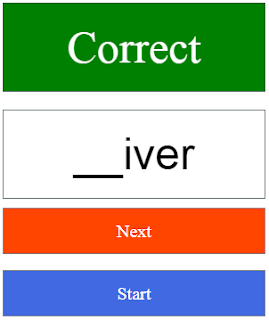
In This Javascript Tutorial we will See How To Create a simple guessing game using HTML, CSS, and JavaScript! .
In this project, we will build a game where the player needs to guess a word with some hidden characters.


Project Source Code:


<!DOCTYPE HTML>

<head>
<style>
p, input{border:1px solid darkslategrey; width: 20%;
padding: 20px; font-size: 50px; margin: 10px 10px 10px 0}

#result{background-color: rgb(253, 189, 27); text-align: center;}

input{text-align: center}

a{display: block; width: 20%; border: 1px solid gray;
height: 50px; line-height: 50px; text-align: center;
background-color: orangered; color: #fff; text-decoration: none;
font-size: 20px; padding:0px 20px 0px 20px}

a:nth-of-type(2){background-color: royalblue}

</style>
</head>

<body>

<p id="result">Result</p>

<input type="text" id="guess"><br>

<a href="#" onclick="nextWord()">Next</a><br>

<a href="#" onclick="start()">Start</a><br>

<script>

// Initializing variables
result = document.getElementById("result");
guess = document.getElementById("guess");
index = -1;
words = ["potato","driver", "tomato","history", "computer",
"appartment", "forest", "chocolat", "lawyer"];

// Function to replace character at a specific index in a string
function setCharAt(str,ind,chr)
{
if(ind > str.length-1) return str;
return str.substring(0,ind) + chr + str.substring(ind+1);
}

// Function to display the current word with random characters hidden
function displayWord()
{
if(index == -1)
{
result.innerText = "--Result--";
guess.value = "GUESS";
}
else
{
word = words[index];
pos1 = Math.floor(Math.random()*words[index].length);
pos2 = Math.floor(Math.random()*words[index].length);
pos3 = Math.floor(Math.random()*words[index].length);

word = setCharAt(word,pos1,'_');
word = setCharAt(word,pos2,'_');
word = setCharAt(word,pos3,'_');

guess.value = word;

}
}

// Function to check the user's guess against the current word
function checkWord()
{
if(guess.value == words[index])
{
result.innerText = "Correct";
result.style.backgroundColor = "Green";
result.style.color = "#fff";
}
else
{
result.innerText = "Wrong";
result.style.backgroundColor = "Red";
result.style.color = "#fff";
}
}
// Function to move to the next word
function nextWord()
{
checkWord();
if(index < words.length - 1)
{
index++;
displayWord();
}
}

// Function to start the game
function start()
{
index = 0;
result.innerText = "--Result--";
guess.value = "GUESS";
result.style.backgroundColor = "rgb(253, 189, 27)";
result.style.color = "#000";
displayWord();
}

// Display the initial word
displayWord();

</script>


</body>

</html>


The main logic of the game resides in two functions: displayWord() and checkWord(). 

The displayWord() function will randomly hide three characters of the current word using underscores (_) and update the input field accordingly. 

The checkWord() function will compare the player's guess with the actual word and display the result in the result paragraph.

We will also implement the nextWord() function to handle moving to the next word in the array and calling the necessary functions to update the display.

Finally, we will create the start() function to initialize the game, setting the initial values, and displaying the first word.


////// OUTPUT : 
Word Guessing  Game In Javascript

Word Guessing  Game In Javascript

Guess the Word Game In Javascript

Guess the Word Game In Javascript


download the source code


C# - Guess The Word Game Source Code

How To Create a Guess The Word Game in C#

Guess The Word Game In C#


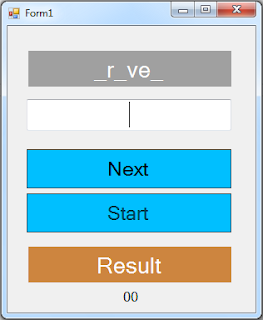
in this c# form tutorial , we'll learn how to create an entertaining Guess the Word game using the C# programming language.

game rules:
- The PC presents a word with several missing letters, as in '_c _ a _ a', and it is the user's task to correctly guess the word..

tools:
- c# programming language.
- microsoft visual studio express 2013.
- pixabay.com (images).

Watch The Full Project Tutorial


- The Project Source Code


using System;
using System.Collections.Generic;
using System.ComponentModel;
using System.Data;
using System.Drawing;
using System.Linq;
using System.Text;
using System.Threading.Tasks;
using System.Windows.Forms;

namespace Csharp_GuessWordGame
{
    public partial class Form1 : Form
    {
        public Form1()
        {
            InitializeComponent();
        }

        string[] words = new[]{"driver","signature","history", "response",
                               "president","highway", "computer", "appartment", 
                               "forest", "chocolat", "lawyer"};
        int index = 0, score = 0;
        Random random = new Random();

        // button start
        private void button_start_Click(object sender, EventArgs e)
        {
            index = 0;
            score = 0;
            label_result.Text = "Result";
            label_result.BackColor = Color.Peru;
            label_score.Text = "00";
            displayWord();
            button_next.Enabled = true;
            button_start.Enabled = false;
        }

        // button next
        private void button_next_Click(object sender, EventArgs e)
        {
            checkWord();
            if(index < words.Length - 1)
            {
                index++;
                displayWord();
            }
            
        }

        // create a function to display the words
        public void displayWord()
        {
            int pos1 = random.Next(words[index].Length);
            int pos2 = random.Next(words[index].Length);
            int pos3 = random.Next(words[index].Length);

            string word = words[index];

            word = word.Remove(pos1, 1).Insert(pos1, "_");
            word = word.Remove(pos2, 1).Insert(pos2, "_");
            word = word.Remove(pos3, 1).Insert(pos3, "_");

            label_word.Text = word;

        }

        // create a function to check if the guessed word is correct
        public void checkWord()
        {
            if(textBox_guess.Text.ToLower().Equals(words[index]))
            {
                label_result.Text = "Correct";
                label_result.BackColor = Color.Green;
                score++;
            }
            else
            {
                label_result.Text = "Wrong";
                label_result.BackColor = Color.Red;
            }
            if(index == words.Length - 1)
            {
                button_start.Enabled = true;
                button_next.Enabled = false;
            }
            textBox_guess.Text = "";
            label_score.Text = score.ToString() + " / " + words.Length.ToString();
        }
    }
}


OUTPUT:
Word Guessing Game in C#

C# Word Guessing Game

Guess The Word Game In C#

Guess The Word Game In C#


Java - Guess The Word Game Source Code

How To Make Guess The Word Game Project Using NetBeans

Java Guess The Word Game Source Code


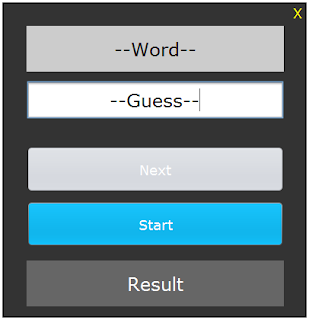
In this Java Tutorial we will see How to Make a Simple Word Guessing Game App In Java NetBeans. 
In This Java NetBeans Game Project We Will Use Using Jframe JPanels, JButtons and Jlabels .


Project Source Code:

     // array of words
    String[] words = {"driver","signature","history", "response","president","highway", 
                      "computer", "appartment", "forest", "chocolat", "lawyer"};
    int index = -1;
    
    Border panel_border = BorderFactory.createMatteBorder(2, 2, 2, 2, Color.black);
    
    public Guess_Word_Game() {
        initComponents();
        
        this.setLocationRelativeTo(null);
        
        jPanel1.setBorder(panel_border);
        
        displayWord();
        
        jButton_Next_.setEnabled(false);
    }
    
   
    // create a function to display the word
    public void displayWord()
    {
        // default text
        if(index == -1)
        {
            jLabel_Word.setText("--Word--");
            jTextField_Guess.setText("--Guess--");
        }
        else
        {
            // get random position
            int pos1 = (int) (Math.random() * words[index].length());
            int pos2 = (int) (Math.random() * words[index].length());
            int pos3 = (int) (Math.random() * words[index].length());
            
            // set '_' at random positions
            StringBuilder newtext = new StringBuilder(words[index]);
            newtext.setCharAt(pos1, '_');
            newtext.setCharAt(pos2, '_');
            newtext.setCharAt(pos3, '_');
            
            // set text to the jlabel
            jLabel_Word.setText(newtext.toString());
        }
    }
    
    // create a function to check if the user guessed the correct word
    public void checkWord()
    {
        // if the guess is correct
        if(jTextField_Guess.getText().equals(words[index]))
        {
            jLabel_Result.setText("Correct");
            jLabel_Result.setBackground(Color.green);
        }
        // if not
        else
        {
            jLabel_Result.setText("Wrong");
            jLabel_Result.setBackground(Color.red);
        }
        // if it's the last word in the list
        if(index == words.length - 1)
        {
            jButton_Next_.setEnabled(false);
            jButton_Start_.setEnabled(true);
        }
        jTextField_Guess.setText("");
    }
    
     // label to close the form
    private void jLabel_Close_MouseClicked(java.awt.event.MouseEvent evt) {                                           
        // close the form
        System.exit(0);
    }                                          

    // button start / restart the game
    private void jButton_Start_ActionPerformed(java.awt.event.ActionEvent evt) {                                               
        // start or restart the game
        index = 0;
        jTextField_Guess.setText("");
        jButton_Next_.setEnabled(true);
        jButton_Start_.setEnabled(false);
        jLabel_Result.setText("Result");
        jLabel_Result.setBackground(new java.awt.Color(102, 102, 102));
        displayWord(); 
    }                                              

    // button next
    private void jButton_Next_ActionPerformed(java.awt.event.ActionEvent evt) {                                              
        // check the word / display the next word
        checkWord();
        if(index < words.length - 1)
        {
           index++;
           displayWord(); 
        }
    }                                             


////// OUTPUT : 

Guess The Word Game Source Code In Java 1

Guess The Word Game Source Code In Java 2

Guess The Word Game Source Code In Java 3

Guess The Word Game Source Code In Java 4

Guess The Word Game Source Code In Java 5


download the source code


More Java Projects: