Affichage des articles dont le libellé est jtable column. Afficher tous les articles

Java JTable With Custom Columns

How to Create a JTable with Custom Columns In Java Netbeans

Create JTable With RadioButton, CheckBox, ComboBox, Spinner, TextField and Button Columns In Java Netbeans


In this Java Tutorial we will see How To Create a JTable with custom components in each cell. The table has six columns: RadioButton, CheckBox, ComboBox, Spinner, TextField, and Button.
For each column in the table, custom renderers and editors are set using the setColumnRendererAndEditor method. 
This method associates a TableCellRenderer (for rendering cell content) and a TableCellEditor (for editing cell content) with a specific column in the table.
The getJobList Method: Returns an array of job titles. This array is used to populate the ComboBox in the third column.

What We Are Gonna Use In This Project:

- Java Programming Language.
- NetBeans Editor.


Project Source Code:

RadioButtonRenderer Class:

public class RadioButtonRenderer extends JRadioButton implements TableCellRenderer{

    public RadioButtonRenderer(){
        setHorizontalAlignment(SwingConstants.CENTER);
        setOpaque(false);
    }
    
    @Override
    public Component getTableCellRendererComponent(JTable table, Object value, boolean isSelected, boolean hasFocus, int row, int column) {
     
        // Set the selected state based on the value
        setSelected(value != null && (boolean)value);
        return this;
    
    }

}


RadioButtonEditor Class:

public class RadioButtonEditor extends AbstractCellEditor implements TableCellEditor{

    private final JRadioButton button;
    
    public RadioButtonEditor(){
        button = new JRadioButton();
        button.setHorizontalAlignment(SwingConstants.CENTER);
    }
    
    
    @Override
    public Object getCellEditorValue() {
    
        // retun the value of the radiobutton
        return button.isSelected();
        
    }

    @Override
    public Component getTableCellEditorComponent(JTable table, Object value, boolean isSelected, int row, int column) {
    
        // Set the selected state based on the value
        button.setSelected(value != null && (boolean)value);
        return button;
        
    }

    
}


JTable With RadioButton Column


CheckBoxRenderer Class:

public class CheckBoxRenderer extends DefaultTableCellRenderer{

    private final JCheckBox checkBox = new JCheckBox();
    
    public CheckBoxRenderer(){
        checkBox.setHorizontalAlignment(SwingConstants.CENTER);
    }
    
    @Override
    public Component getTableCellRendererComponent(JTable table, Object value, boolean isSelected, boolean hasFocus, int row, int column) {
     
        // Set the selected state based on the value
        checkBox.setSelected(value != null && (boolean)value);
        return checkBox;
    
    }
    
}


CheckBoxEditor Class:

public class CheckBoxEditor extends AbstractCellEditor implements TableCellEditor{

    private final JCheckBox checkBox = new JCheckBox();
    
    public CheckBoxEditor(){
        checkBox.setHorizontalAlignment(SwingConstants.CENTER);
    }
    
    @Override
    public Object getCellEditorValue() {
    
        // retun the value of the checkbox
        return checkBox.isSelected();
        
    }

    @Override
    public Component getTableCellEditorComponent(JTable table, Object value, boolean isSelected, int row, int column) {
    
        // Set the selected state based on the value
        checkBox.setSelected((boolean)value);
        return checkBox;
        
    }
    
}


JTable With CheckBox Column


ComboboxRenderer Class:

public class ComboboxRenderer extends JComboBox<String> implements TableCellRenderer{

    public ComboboxRenderer(String[] items){ super(items); }
    
    @Override
    public Component getTableCellRendererComponent(JTable table, Object value, boolean isSelected, boolean hasFocus, int row, int column) {
     
        // Set the selected item in the JComboBox based on the cell value
        setSelectedItem(value);
        
        // Ensure the JComboBox is focused before rendering
        if(hasFocus){ requestFocusInWindow(); } 
        
        return this;
    }

}


ComboboxEditor Class:

public class ComboboxEditor extends DefaultCellEditor{

    public ComboboxEditor(String[] items){ 
        super(new JComboBox<>(items)); 
        // Set the number of clicks needed to start editing
        setClickCountToStart(0);
    }
    
    @Override
    public Component getTableCellEditorComponent(JTable table, Object value, boolean isSelected, int row, int column) {
     
         // Set the selected item in the JComboBox based on the cell value
         ((JComboBox<?>) editorComponent).setSelectedItem(value);
         
         // Ensure the JComboBox is focused before editing
         SwingUtilities.invokeLater(() -> {
             ((JComboBox<?>) editorComponent).requestFocusInWindow();
         });
        
         return editorComponent;
    }
    
    
    @Override
    public Object getCellEditorValue(){
        // Return the selected item from the JComboBox
        return ((JComboBox<?>) editorComponent).getSelectedItem();
    }
  
}


JTable With ComboBox Column


SpinnerRenderer Class:

public class SpinnerRenderer extends JSpinner implements TableCellRenderer{
    
    @Override
    public Component getTableCellRendererComponent(JTable table, Object value, boolean isSelected, boolean hasFocus, int row, int column) {
    
        // set value of the spinner
        setValue(value);
        return this;
    
    }

}


SpinnerEditor Class:

public class SpinnerEditor extends DefaultCellEditor{

    public SpinnerEditor(JSpinner spinner) {
        // Initialize the spinner editor
        super(new JCheckBox());
        editorComponent = spinner;
        delegate = new EditorDelegate() {
            
            // Set the value of the spinner
            @Override
            public void setValue(Object value){spinner.setValue(value);}
            
            // Get the value of the spinner
            @Override
            public Object getCellEditorValue(){ return spinner.getValue(); }
            
        };
    }
 
}


JTable With Spinner Column


TextFieldRenderer Class:

public class TextFieldRenderer extends JTextField implements TableCellRenderer{

    public TextFieldRenderer(){setHorizontalAlignment(JTextField.CENTER);}

    @Override
    public Component getTableCellRendererComponent(JTable table, Object value, boolean isSelected, boolean hasFocus, int row, int column) {
      
        // Set the text of the text field
        setText(value != null ? value.toString() : "");
        return this;
        
    }
    
}


JTable With TextField Column


ButtonRenderer Class:

public class ButtonRenderer extends JButton implements TableCellRenderer{

    @Override
    public Component getTableCellRendererComponent(JTable table, Object value, boolean isSelected, boolean hasFocus, int row, int column) {
    
        // Set the text of the button
        setText(value != null ? value.toString() : "");
        return this;
        
    }

}


ButtonEditor Class:

public class ButtonEditor extends DefaultCellEditor{

    private JButton button;
    
    public ButtonEditor(JCheckBox checkBox) {
        // Initialize the button editor and add action listener for button click
        super(checkBox);
        button = new JButton();
        button.addActionListener((e) -> {
            JOptionPane.showMessageDialog(button, button.getText() + " Clicked");
        });
        
    }
    
    @Override
    public Component getTableCellEditorComponent(JTable table, Object value, boolean isSelected, int row, int column) {
        // Set the text of the button
        button.setText(value != null ? value.toString() : "");
        return button;        
    }
    
    // Get the text of the button
    @Override
    public Object getCellEditorValue(){ return button.getText(); }

}


JTable With Button Column


CustomTableModel Class:

public class CustomTableModel extends AbstractTableModel{
    private final Object[][] data;
    private final String[] columnNames;
    
    public CustomTableModel(Object[][] data, String[] columnNames){
        this.data = data;
        this.columnNames = columnNames;
    }
    

    @Override
    public int getRowCount() { return data.length; }

    @Override
    public int getColumnCount() { return columnNames.length; }

    @Override
    public Object getValueAt(int rowIndex, int columnIndex) {
    
        return data[rowIndex][columnIndex];
        
    }

    @Override
    public String getColumnName(int column){ return columnNames[column]; }
    
    @Override
    public Class<?> getColumnClass(int column){ return data[0][column].getClass(); }
    
    @Override
    public boolean isCellEditable(int row, int column){ return true; }
    
    @Override
    public void setValueAt(Object value, int row, int column){
        // Update the data and notify listeners of the change
        data[row][column] = value;
        fireTableCellUpdated(row, column);
    }
    
    
}


The MainClass Class:

public class MainClass extends JFrame{

    public MainClass(){
        setTitle("Table Custom Component");
        setDefaultCloseOperation(JFrame.EXIT_ON_CLOSE);
        
        CustomTableModel model = new CustomTableModel(
                new Object[][]{
                        {false, false, "Developer", 1, "Text 1", "Button 1"},
                        {false, true, "Designer", 2, "Text 2", "Button 2"},
                        {true, false, "Manager", 3, "Text 3", "Button 3"},
                        {true, false, "Engineer", 4, "Text 4", "Button 4"}
                },
                new String[]{"RadioButton", "CheckBox", "ComboBox", "Spinner", "TextField", "Button"}
        );
        
        
        JTable table = new JTable(model);
        table.setRowHeight(40);
        
        setColumnRendererAndEditor(table, 0, new RadioButtonRenderer(), new RadioButtonEditor());
        setColumnRendererAndEditor(table, 1, new CheckBoxRenderer(), new CheckBoxEditor());
        setColumnRendererAndEditor(table, 2, new ComboboxRenderer(getJobList()), new ComboboxEditor(getJobList()));
        setColumnRendererAndEditor(table, 3, new SpinnerRenderer(), new SpinnerEditor(new JSpinner()));
        setColumnRendererAndEditor(table, 4, new TextFieldRenderer(), new DefaultCellEditor(new JTextField()));
        setColumnRendererAndEditor(table, 5, new ButtonRenderer(), new ButtonEditor(new JCheckBox()));
        
        
        JScrollPane scrollPanel = new JScrollPane(table);
        add(scrollPanel);
        setSize(600, 400);
        setLocationRelativeTo(null);
        
    }
    
    
    private void setColumnRendererAndEditor(JTable table, int columnIndex, TableCellRenderer renderer, TableCellEditor editor){
        // Set the renderer and editor for a specific column
        table.getColumnModel().getColumn(columnIndex).setCellRenderer(renderer);
        table.getColumnModel().getColumn(columnIndex).setCellEditor(editor);
    }
    
    
    private String[] getJobList(){
        // Return an array of job titles
        // we will use it to populate the combobox
        return new String[]{"Engineer", "Designer", "Manager", "Developer", "Analyst"};
        
    }
    
    
    public static void main(String[] args) {
        MainClass app = new MainClass();
        app.setVisible(true);
    }
    
}


The Final Result:

Java JTable With Custom Columns


if you want the full source code click on the download button below


disclaimer: you will get the source code, and to make it work in your machine is your responsibility and to debug any error/exception is your responsibility this project is for the students who want to see an example and read the code not to get and run.


Java JTable - How To Get JTable Column Average Value In Java NetBeans

How To Calculate JTable Column Average Value In Java 

jtable average column value

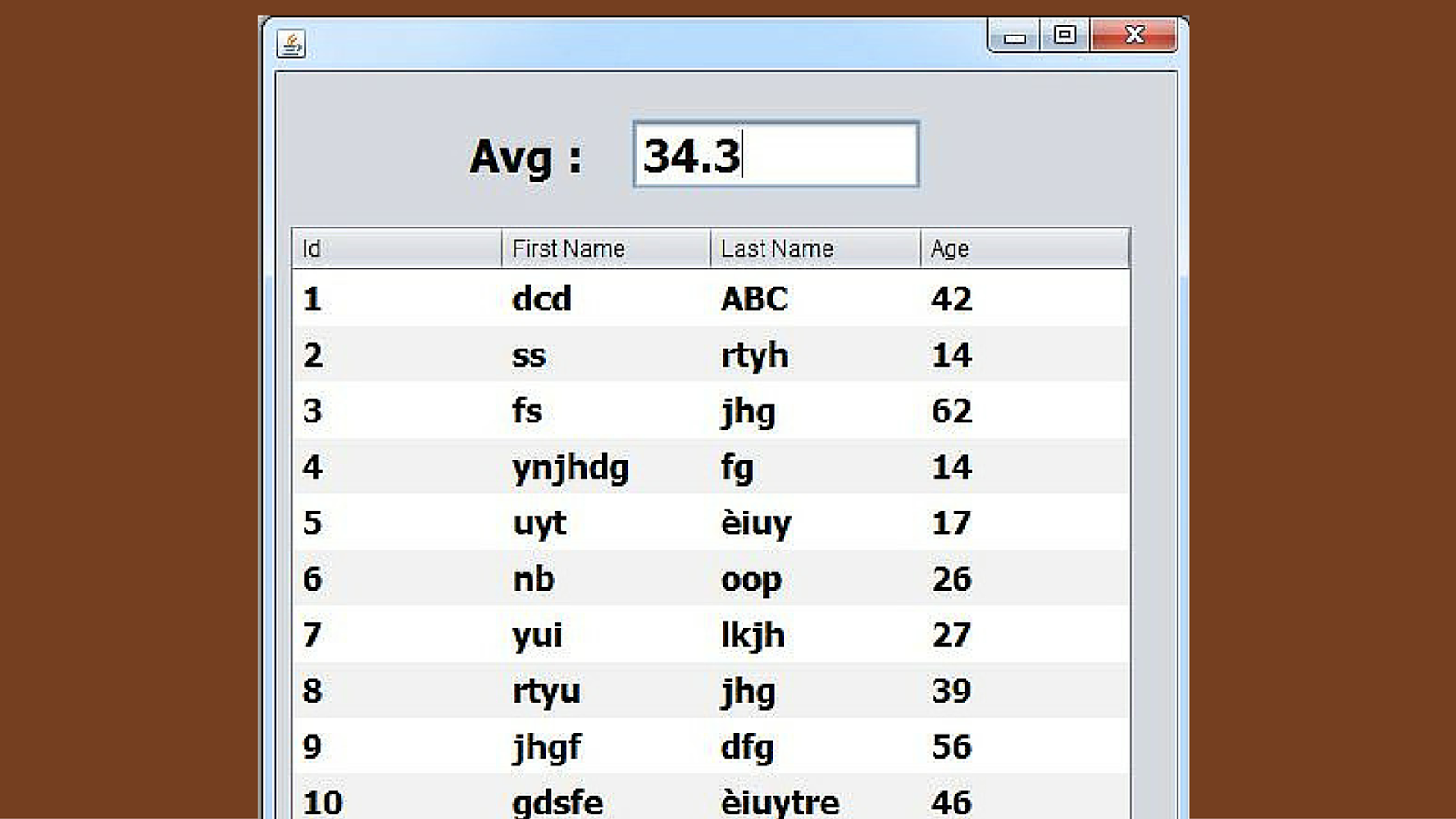
In this java Tutorial we will see How To Calculate JTable Column Average Value And Display It In JTextFields In Java NetBeans .


Project Source Code:

package java_tutorials;

/**
 *
 * @author 1BestCsharp
 */
public class Java_JTable_Column_Average_Value extends javax.swing.JFrame {

    /**
     * Creates new form Java_JTable_Column_Average_Value
     */
    public Java_JTable_Column_Average_Value() {
        initComponents();
        getAverage();
    }

    
    public void getAverage()
    {
        float sum = 0;
        for(int i = 0; i < jTable1.getRowCount(); i++)
        {
            sum = sum + Integer.parseInt(jTable1.getValueAt(i, 3).toString());
        }
        
        float avg = sum / jTable1.getRowCount();
        jTextField1.setText(Float.toString(avg));
    }


    /**
     * This method is called from within the constructor to initialize the form.
     * WARNING: Do NOT modify this code. The content of this method is always
     * regenerated by the Form Editor.
     */
    @SuppressWarnings("unchecked")
    // <editor-fold defaultstate="collapsed" desc="Generated Code">                          
    private void initComponents() {

        jScrollPane1 = new javax.swing.JScrollPane();
        jTable1 = new javax.swing.JTable();
        jTextField1 = new javax.swing.JTextField();
        jLabel1 = new javax.swing.JLabel();

        setDefaultCloseOperation(javax.swing.WindowConstants.EXIT_ON_CLOSE);

        jTable1.setFont(new java.awt.Font("Tahoma", 1, 18)); // NOI18N
        jTable1.setModel(new javax.swing.table.DefaultTableModel(
            new Object [][] {
                {"1", "dcd", "ABC", "42"},
                {"2", "ss", "rtyh", "14"},
                {"3", "fs", "jhg", "62"},
                {"4", "ynjhdg", "fg", "14"},
                {"5", "uyt", "èiuy", "17"},
                {"6", "nb", "oop", "26"},
                {"7", "yui", "lkjh", "27"},
                {"8", "rtyu", "jhg", "39"},
                {"9", "jhgf", "dfg", "56"},
                {"10", "gdsfe", "èiuytre", "46"}
            },
            new String [] {
                "Id", "First Name", "Last Name", "Age"
            }
        ));
        jTable1.setRowHeight(30);
        jScrollPane1.setViewportView(jTable1);

        jTextField1.setFont(new java.awt.Font("Tahoma", 1, 24)); // NOI18N

        jLabel1.setFont(new java.awt.Font("Tahoma", 1, 24)); // NOI18N
        jLabel1.setText("Avg :");

        javax.swing.GroupLayout layout = new javax.swing.GroupLayout(getContentPane());
        getContentPane().setLayout(layout);
        layout.setHorizontalGroup(
            layout.createParallelGroup(javax.swing.GroupLayout.Alignment.LEADING)
            .addGroup(layout.createSequentialGroup()
                .addGroup(layout.createParallelGroup(javax.swing.GroupLayout.Alignment.LEADING)
                    .addGroup(layout.createSequentialGroup()
                        .addContainerGap()
                        .addComponent(jScrollPane1, javax.swing.GroupLayout.PREFERRED_SIZE, javax.swing.GroupLayout.DEFAULT_SIZE, javax.swing.GroupLayout.PREFERRED_SIZE))
                    .addGroup(layout.createSequentialGroup()
                        .addGap(104, 104, 104)
                        .addComponent(jLabel1, javax.swing.GroupLayout.PREFERRED_SIZE, 69, javax.swing.GroupLayout.PREFERRED_SIZE)
                        .addGap(18, 18, 18)
                        .addComponent(jTextField1, javax.swing.GroupLayout.PREFERRED_SIZE, 156, javax.swing.GroupLayout.PREFERRED_SIZE)))
                .addContainerGap(22, Short.MAX_VALUE))
        );
        layout.setVerticalGroup(
            layout.createParallelGroup(javax.swing.GroupLayout.Alignment.LEADING)
            .addGroup(layout.createSequentialGroup()
                .addGap(25, 25, 25)
                .addGroup(layout.createParallelGroup(javax.swing.GroupLayout.Alignment.BASELINE)
                    .addComponent(jLabel1)
                    .addComponent(jTextField1, javax.swing.GroupLayout.PREFERRED_SIZE, 38, javax.swing.GroupLayout.PREFERRED_SIZE))
                .addGap(18, 18, 18)
                .addComponent(jScrollPane1, javax.swing.GroupLayout.PREFERRED_SIZE, 334, javax.swing.GroupLayout.PREFERRED_SIZE)
                .addContainerGap(27, Short.MAX_VALUE))
        );

        pack();
    }// </editor-fold>                        

    /**
     * @param args the command line arguments
     */
    public static void main(String args[]) {
        /* Set the Nimbus look and feel */
        //<editor-fold defaultstate="collapsed" desc=" Look and feel setting code (optional) ">
        /* If Nimbus (introduced in Java SE 6) is not available, stay with the default look and feel.
         * For details see http://download.oracle.com/javase/tutorial/uiswing/lookandfeel/plaf.html 
         */
        try {
            for (javax.swing.UIManager.LookAndFeelInfo info : javax.swing.UIManager.getInstalledLookAndFeels()) {
                if ("Nimbus".equals(info.getName())) {
                    javax.swing.UIManager.setLookAndFeel(info.getClassName());
                    break;
                }
            }
        } catch (ClassNotFoundException ex) {
            java.util.logging.Logger.getLogger(Java_JTable_Column_Average_Value.class.getName()).log(java.util.logging.Level.SEVERE, null, ex);
        } catch (InstantiationException ex) {
            java.util.logging.Logger.getLogger(Java_JTable_Column_Average_Value.class.getName()).log(java.util.logging.Level.SEVERE, null, ex);
        } catch (IllegalAccessException ex) {
            java.util.logging.Logger.getLogger(Java_JTable_Column_Average_Value.class.getName()).log(java.util.logging.Level.SEVERE, null, ex);
        } catch (javax.swing.UnsupportedLookAndFeelException ex) {
            java.util.logging.Logger.getLogger(Java_JTable_Column_Average_Value.class.getName()).log(java.util.logging.Level.SEVERE, null, ex);
        }
        //</editor-fold>

        /* Create and display the form */
        java.awt.EventQueue.invokeLater(new Runnable() {
            public void run() {
                new Java_JTable_Column_Average_Value().setVisible(true);
            }
        });
    }

    // Variables declaration - do not modify                     
    private javax.swing.JLabel jLabel1;
    private javax.swing.JScrollPane jScrollPane1;
    private javax.swing.JTable jTable1;
    private javax.swing.JTextField jTextField1;
    // End of variables declaration                   
}


////////////////OutPut

jtable column average value
JTable Average Column Value


Java JTable - How To Get JTable Column Maximum Value In Java NetBeans

How To Calculate JTable Column Max Value In Java NetBeans

jtable maximum column value

In this java Tutorial we will see How To Calculate JTable Column Max Value And Display It In JTextFields In Java NetBeans .


Project Source Code:

package java_tutorials;

import java.util.ArrayList;
import java.util.Collections;

/**
 *
 * @author 1BestCsharp
 */
public class Java_JTable_Column_Max_Value extends javax.swing.JFrame {

    /**
     * Creates new form Java_JTable_Column_Max_Value
     */
    public Java_JTable_Column_Max_Value() {
        initComponents();
        getMax2();
    }

    // Method 1
    public void getMax()
    {
        ArrayList<Integer> list = new ArrayList<Integer>();
        for(int i = 0; i < jTable1.getRowCount(); i++)
        {
            list.add(Integer.parseInt(jTable1.getValueAt(i, 3).toString()));
        }
        
        int max = Collections.max(list);
        jTextField1.setText(Integer.toString(max));
    }
    
// Method 2
    public void getMax2()
    {
        int max2 = 0;
        
        for(int i = 0; i < jTable1.getRowCount(); i++)
        {
          int val = Integer.parseInt(jTable1.getValueAt(i, 3).toString());
          if(val > max2)
          {
              max2 = val;
          }
        }
         jTextField1.setText(Integer.toString(max2));
    }


    /**
     * This method is called from within the constructor to initialize the form.
     * WARNING: Do NOT modify this code. The content of this method is always
     * regenerated by the Form Editor.
     */
    @SuppressWarnings("unchecked")
    // <editor-fold defaultstate="collapsed" desc="Generated Code">                          
    private void initComponents() {

        jScrollPane1 = new javax.swing.JScrollPane();
        jTable1 = new javax.swing.JTable();
        jTextField1 = new javax.swing.JTextField();
        jLabel1 = new javax.swing.JLabel();

        setDefaultCloseOperation(javax.swing.WindowConstants.EXIT_ON_CLOSE);

        jTable1.setFont(new java.awt.Font("Tahoma", 1, 18)); // NOI18N
        jTable1.setModel(new javax.swing.table.DefaultTableModel(
            new Object [][] {
                {"1", "dcd", "ABC", "42"},
                {"2", "ss", "rtyh", "14"},
                {"3", "fs", "jhg", "62"},
                {"4", "ynjhdg", "fg", "14"},
                {"5", "uyt", "èiuy", "17"},
                {"6", "nb", "oop", "26"},
                {"7", "yui", "lkjh", "27"},
                {"8", "rtyu", "jhg", "39"},
                {"9", "jhgf", "dfg", "56"},
                {"10", "gdsfe", "èiuytre", "46"}
            },
            new String [] {
                "Id", "First Name", "Last Name", "Age"
            }
        ));
        jTable1.setRowHeight(30);
        jScrollPane1.setViewportView(jTable1);

        jTextField1.setFont(new java.awt.Font("Tahoma", 1, 24)); // NOI18N

        jLabel1.setFont(new java.awt.Font("Tahoma", 1, 24)); // NOI18N
        jLabel1.setText("Max :");

        javax.swing.GroupLayout layout = new javax.swing.GroupLayout(getContentPane());
        getContentPane().setLayout(layout);
        layout.setHorizontalGroup(
            layout.createParallelGroup(javax.swing.GroupLayout.Alignment.LEADING)
            .addGroup(layout.createSequentialGroup()
                .addGroup(layout.createParallelGroup(javax.swing.GroupLayout.Alignment.LEADING)
                    .addGroup(layout.createSequentialGroup()
                        .addContainerGap()
                        .addComponent(jScrollPane1, javax.swing.GroupLayout.PREFERRED_SIZE, javax.swing.GroupLayout.DEFAULT_SIZE, javax.swing.GroupLayout.PREFERRED_SIZE))
                    .addGroup(layout.createSequentialGroup()
                        .addGap(104, 104, 104)
                        .addComponent(jLabel1, javax.swing.GroupLayout.PREFERRED_SIZE, 69, javax.swing.GroupLayout.PREFERRED_SIZE)
                        .addGap(18, 18, 18)
                        .addComponent(jTextField1, javax.swing.GroupLayout.PREFERRED_SIZE, 156, javax.swing.GroupLayout.PREFERRED_SIZE)))
                .addContainerGap(javax.swing.GroupLayout.DEFAULT_SIZE, Short.MAX_VALUE))
        );
        layout.setVerticalGroup(
            layout.createParallelGroup(javax.swing.GroupLayout.Alignment.LEADING)
            .addGroup(layout.createSequentialGroup()
                .addGap(25, 25, 25)
                .addGroup(layout.createParallelGroup(javax.swing.GroupLayout.Alignment.BASELINE)
                    .addComponent(jLabel1)
                    .addComponent(jTextField1, javax.swing.GroupLayout.PREFERRED_SIZE, 38, javax.swing.GroupLayout.PREFERRED_SIZE))
                .addGap(18, 18, 18)
                .addComponent(jScrollPane1, javax.swing.GroupLayout.PREFERRED_SIZE, 334, javax.swing.GroupLayout.PREFERRED_SIZE)
                .addContainerGap(javax.swing.GroupLayout.DEFAULT_SIZE, Short.MAX_VALUE))
        );

        pack();
    }// </editor-fold>                        

    /**
     * @param args the command line arguments
     */
    public static void main(String args[]) {
        /* Set the Nimbus look and feel */
        //<editor-fold defaultstate="collapsed" desc=" Look and feel setting code (optional) ">
        /* If Nimbus (introduced in Java SE 6) is not available, stay with the default look and feel.
         * For details see http://download.oracle.com/javase/tutorial/uiswing/lookandfeel/plaf.html 
         */
        try {
            for (javax.swing.UIManager.LookAndFeelInfo info : javax.swing.UIManager.getInstalledLookAndFeels()) {
                if ("Nimbus".equals(info.getName())) {
                    javax.swing.UIManager.setLookAndFeel(info.getClassName());
                    break;
                }
            }
        } catch (ClassNotFoundException ex) {
            java.util.logging.Logger.getLogger(Java_JTable_Column_Max_Value.class.getName()).log(java.util.logging.Level.SEVERE, null, ex);
        } catch (InstantiationException ex) {
            java.util.logging.Logger.getLogger(Java_JTable_Column_Max_Value.class.getName()).log(java.util.logging.Level.SEVERE, null, ex);
        } catch (IllegalAccessException ex) {
            java.util.logging.Logger.getLogger(Java_JTable_Column_Max_Value.class.getName()).log(java.util.logging.Level.SEVERE, null, ex);
        } catch (javax.swing.UnsupportedLookAndFeelException ex) {
            java.util.logging.Logger.getLogger(Java_JTable_Column_Max_Value.class.getName()).log(java.util.logging.Level.SEVERE, null, ex);
        }
        //</editor-fold>

        /* Create and display the form */
        java.awt.EventQueue.invokeLater(new Runnable() {
            public void run() {
                new Java_JTable_Column_Max_Value().setVisible(true);
            }
        });
    }

    // Variables declaration - do not modify                     
    private javax.swing.JLabel jLabel1;
    private javax.swing.JScrollPane jScrollPane1;
    private javax.swing.JTable jTable1;
    private javax.swing.JTextField jTextField1;
    // End of variables declaration                   
}


////////////////OutPut
jtable maximum column value