Affichage des articles dont le libellé est Glass Stepping Stones Game. Afficher tous les articles

Javascript - Create Glass Bridge Game

How To Make The Glass Bridge Game From Squid Game In Javascript Using VS Code


In this JavaScript Tutorial we will see How to Make The Glass Stepping Stones Game or the glass bridge game From Squid Game In JavaScript and Visual Studio Code .

The Game Rules:
the player have to hop across a bridge of glasses with some glasses that breack easily.


Project Source Code:


<!DOCTYPE HTML>

<head>
<style>
.container{display: flex; flex-direction: row; flex-wrap: wrap;
justify-content: center; align-items: center}
.content, .start, .finish, .pic, .panels, .top, .bottom{
border: 1px solid lightslategray; box-sizing: border-box}
.start, .finish{width:120px; height: 220px; margin: 5px;
display: flex; flex-direction: row;
flex-wrap: wrap; justify-content: center; align-items: center}
.start, .finish, .panels{float: left;}
.panels{width: 850px; height: 220px; margin: 5px}
.top, .bottom{height: 110px; background-color: #2E2C28;display: flex;
flex-direction: row;
flex-wrap: wrap; justify-content: center; align-items: center}
.glass{width: 110px;height: 100px;border: 1px solid #fff;
background-color: #FFDF2B;
margin: 2px; background-size: 100% 100%;}
.glass:hover{background-color: darkgoldenrod}
#pic-start, #pic-finish{background-color: #FFDF2B; width: 100px; height: 100px;
background-size: 100% 100%;}
#pic-start{background-image: url('C://Users//1BestCsharp//Downloads//steps.png')}
#play-again{color: #fff; background-color: green; width:100%;
padding: 20px; border: 1px solid #fff}


</style>
</head>

<body>

<div class="container">

<div class="content">
<div class="start">
<div class="pic" id="pic-start">

</div>
</div>
<div class="panels">
<div class="top">
<button onclick="stepInThis(this)" class="glass g1"
disabled="disabled"></button>
<button onclick="stepInThis(this)" class="glass g1"
disabled="disabled"></button>
<button onclick="stepInThis(this)" class="glass g1"
disabled="disabled"></button>
<button onclick="stepInThis(this)" class="glass g1"
disabled="disabled"></button>
<button onclick="stepInThis(this)" class="glass g1"
disabled="disabled"></button>
<button onclick="stepInThis(this)" class="glass g1"
disabled="disabled"></button>
<button onclick="stepInThis(this)" class="glass g1"
disabled="disabled"></button>
</div>
<div class="bottom">
<button onclick="stepInThis(this)" class="glass g2"
disabled="disabled"></button>
<button onclick="stepInThis(this)" class="glass g2"
disabled="disabled"></button>
<button onclick="stepInThis(this)" class="glass g2"
disabled="disabled"></button>
<button onclick="stepInThis(this)" class="glass g2"
disabled="disabled"></button>
<button onclick="stepInThis(this)" class="glass g2"
disabled="disabled"></button>
<button onclick="stepInThis(this)" class="glass g2"
disabled="disabled"></button>
<button onclick="stepInThis(this)" class="glass g2"
disabled="disabled"></button>
</div>
</div>
<div class="finish">
<div class="pic" id="pic-finish">
</div>
</div>

<div>
<button id="play-again" onclick="playagain()">Play Again</button>
</div>

</div>

</div>

<script>
glasses = document.getElementsByClassName('glass');
g1 = document.getElementsByClassName('g1');
g2 = document.getElementsByClassName('g2');
div_finish = document.getElementById('pic-finish');
step = "C://Users//1BestCsharp//Downloads//steps.png";
nostep = "C://Users//1BestCsharp//Downloads//nostep.png";
list = [step, nostep];
imagesOrder = [[]];
counter = 0;
won = true;
index = 0;


// create a function to enable buttons
function enableButton()
{
if(counter <= g1.length - 1)
{
g1[counter].disabled = false;
g2[counter].disabled = false;
}
}

// create a function to populate imagesOrder with random images
function getRandomImages()
{
for(let i = 0; i < g1.length; i++)
{
imagesOrder[i] = [];
// get random image
random_image = list[Math.floor(Math.random()*list.length)];

if(random_image == step)
{
imagesOrder[i][0] = random_image;
imagesOrder[i][1] = nostep;
}
else
{
imagesOrder[i][0] = random_image;
imagesOrder[i][1] = step;
}

console.log(imagesOrder[i][1]);
console.log(imagesOrder[i][0]);
console.log("-------------------");

}
}

function stepInThis(pic)
{
if(pic.classList.contains('g1'))
{
if(pic.disabled == false)
{
if(imagesOrder[counter][0] == nostep)
{
won = false;
}
if(counter == imagesOrder.length-1 && won == true)
{
div_finish.setAttribute("style",
"background-image: url('"+imagesOrder[counter][0]+"');");
alert("You've Won");
}
else if(won == false)
{
alert("You've Lost");
}

pic.setAttribute("style",
"background-image: url('"+imagesOrder[counter][0]+"');");
pic.disabled = true;
g2[counter].disabled = true;
counter++;
enableButton();
}
}
else if(pic.classList.contains('g2'))
{
if(pic.disabled == false)
{
if(imagesOrder[counter][1] == nostep)
{
won = false;
}
if(counter == imagesOrder.length-1 && won == true)
{
div_finish.setAttribute("style",
"background-image: url('"+imagesOrder[counter][1]+"');");
alert("You've Won");
}
else if(won == false)
{
alert("You've Lost");
}

pic.setAttribute("style",
"background-image: url('"+imagesOrder[counter][1]+"');");
pic.disabled = true;
g1[counter].disabled = true;
counter++;
enableButton();
}
}
}


// create a function to play again
function playagain()
{
won = true;
for(let i = 0; i < g1.length; i++)
{
g1[i].setAttribute("style","background-image: url();");
g2[i].setAttribute("style","background-image: url();");
g1[i].disabled = true;
g2[i].disabled = true;
}

counter = 0;
enableButton();
getRandomImages();
}


getRandomImages();
enableButton();


</script>

</body>

</html>


////// OUTPUT : 


download the source code


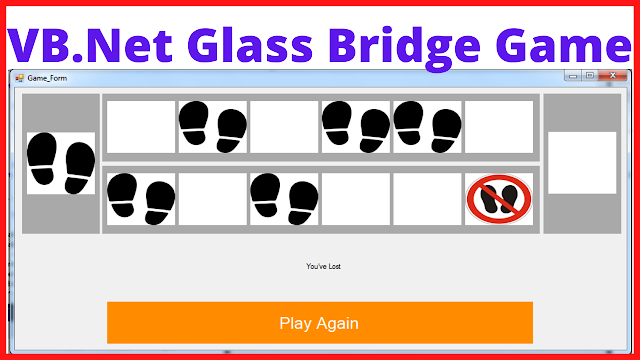
VB.NET - Create Glass Bridge Game

How To Make The Glass Bridge Game From Squid Game In Visual Basic .Net

VB.NET Glass Bridge Game


In this VB.NET Tutorial we will see How To Make The Glass Stepping Stones Game or the glass bridge game From Squid Game Using Panels and PictureBoxes In Visual Basic.Net   Programming Language And Visual  Studio Editor.

The Game Rules:
the player have to hop across a bridge of glasses with some glasses that breack easily.


Project Source Code:


Public Class Game_Form

    Dim footstep As Bitmap = My.Resources.footstep
    Dim nostep As Bitmap = My.Resources.nostep
    Dim random As Random = New Random()
    Dim randomImage As Bitmap
    Dim picBoxes As PictureBox(,)
    Dim imagesOrder As Bitmap(,) = New Bitmap(5, 1) {}
    Dim list As ArrayList = New ArrayList()
    Dim counter As Integer = 0
    Dim won As Boolean = True

    Private Sub Game_Form_Load(sender As Object, e As EventArgs) Handles MyBase.Load

        pictureBoxStart.Image = footstep

        ' array of picturboxes
        picBoxes = {
        {pictureBox_1_1, pictureBox_1_2},
        {pictureBox_2_1, pictureBox_2_2},
        {pictureBox_3_1, pictureBox_3_2},
        {pictureBox_4_1, pictureBox_4_2},
        {pictureBox_5_1, pictureBox_5_2},
        {pictureBox_6_1, pictureBox_6_2}}

        ' add images to the list
        list.Add(footstep)
        list.Add(nostep)

        ' create random images
        createRandomImages()

        ' add event to the pictureboxes
        AddEventToAllPictureboxes(Nothing, Nothing)

        ' enable pictureBoxes
        enablePicBox(counter)

    End Sub

    ' populate the imagesOrder with images in a random order 
    Public Sub createRandomImages()

        'RichTextBox1.Text = ""

        For i As Integer = 0 To 6 - 1
            randomImage = CType(list(random.[Next](list.Count)), Bitmap)
            imagesOrder(i, 0) = randomImage

            If randomImage.Equals(footstep) Then
                imagesOrder(i, 1) = nostep

                'RichTextBox1.Text = RichTextBox1.Text + "Footstep - "
                'RichTextBox1.Text = RichTextBox1.Text + "Nostep"
                'RichTextBox1.Text = RichTextBox1.Text + Environment.NewLine

            Else
                imagesOrder(i, 1) = footstep
                'RichTextBox1.Text = RichTextBox1.Text + "Nostep - "
                'RichTextBox1.Text = RichTextBox1.Text + "Footstep"
                'RichTextBox1.Text = RichTextBox1.Text + Environment.NewLine
            End If
        Next
    End Sub

    ' create an event for the pictureboxes in the top panel
    Public Sub paneltop_picBoxes_click(ByVal sender As Object, ByVal e As EventArgs)
        Dim pbox As PictureBox = CType(sender, PictureBox)

        If pbox.Enabled Then
            pbox.Image = imagesOrder(counter, 1)
            pbox.Enabled = False
            picBoxes(counter, 0).Enabled = False

            If imagesOrder(counter, 1).Equals(nostep) Then
                won = False
            End If

            If counter = 5 AndAlso won = True Then
                pictureBoxFinish.Image = footstep
                label_message.Text = "You've Won"
            ElseIf won = False Then
                label_message.Text = "You've Lost"
            End If

            counter += 1
            enablePicBox(counter)
        End If
    End Sub

    ' create an event for the pictureboxes in the bottom panel
    Public Sub panelbottom_picBoxes_click(ByVal sender As Object, ByVal e As EventArgs)
        Dim pbox As PictureBox = CType(sender, PictureBox)

        If pbox.Enabled Then
            pbox.Image = imagesOrder(counter, 0)
            pbox.Enabled = False
            picBoxes(counter, 1).Enabled = False

            If imagesOrder(counter, 0).Equals(nostep) Then
                won = False
            End If

            If counter = 5 AndAlso won = True Then
                pictureBoxFinish.Image = footstep
                label_message.Text = "You've Won"
            ElseIf won = False Then
                label_message.Text = "You've Lost"
            End If

            counter += 1
            enablePicBox(counter)
        End If
    End Sub

    ' add event to all pictureboxes
    Public Sub AddEventToAllPictureboxes(ByVal sender As Object, ByVal e As EventArgs)
        For Each c As Control In panel_top.Controls

            If TypeOf c Is PictureBox Then
                AddHandler c.Click, AddressOf paneltop_picBoxes_click
            End If
        Next

        For Each c As Control In panel_bottom.Controls

            If TypeOf c Is PictureBox Then
                AddHandler c.Click, AddressOf panelbottom_picBoxes_click
            End If
        Next
    End Sub

    Public Sub enablePicBox(ByVal index As Integer)
        If index <= 5 Then
            picBoxes(index, 0).Enabled = True
            picBoxes(index, 1).Enabled = True
        End If
    End Sub


    Public Sub disableAllPicBox()

        For Each c As Control In panel_top.Controls

            If TypeOf c Is PictureBox Then

                c.Enabled = False

            End If
        Next

        For Each c As Control In panel_bottom.Controls

            If TypeOf c Is PictureBox Then

                c.Enabled = False

            End If
        Next

    End Sub


    Private Sub buttonRestart_Click(sender As Object, e As EventArgs) Handles buttonRestart.Click

        createRandomImages()
        disableAllPicBox()
        won = True
        counter = 0
        label_message.Text = ""
        enablePicBox(counter)
        pictureBoxFinish.Image = Nothing

        For Each pbox As PictureBox In picBoxes
            pbox.Image = Nothing
        Next

    End Sub
End Class


OutPut:

Glass Bridge Game In VB.Net

glass stepping stones game in vb.net

squid game - glass stepping stones game In vb.net

glass bridge game from squid game using vb.net


if you want the source code click on the download button below


Java - Create Glass Bridge Game In Java

How To Make The Glass Bridge Game From Squid Game In Java NetBeans

Java - Create Glass Bridge Game In Java


In this Java Tutorial we will see How to Make The Glass Stepping Stones Game or the glass bridge game From Squid Game Using JPanels and Jlabels In Java NetBeans .

The Game Rules:
the player have to hop across a bridge of glasses with some glasses that breack easily.


Project Source Code:

   
    // create a black border (it's actually yellow)
    Border black_border = BorderFactory.createMatteBorder(1, 1, 1, 1, Color.yellow);
    
    // get the images paths
    String footsteps = "\\/images/foot-steps.png";
    String nosteps = "\\/images/no-steps.png";
    String cracks = "\\/images/cracks.png";
    
    // jpanel component
    Component[] comp1;
    Component[] comp2;
    
    Random random = new Random();
    String randomImage;
    
    JLabel[][] labels;
    String[][] imagesOrder = new String[6][2];
    ArrayList<String> list = new ArrayList<>();
    
    int counter = 0;
    boolean won = true;


        // center this form
        this.setLocationRelativeTo(null);
        
        // set borders
        jPanel_Start.setBorder(black_border);
        jPanel_Finish.setBorder(black_border);
        jLabel_PlayerStart.setBorder(black_border);
        jLabel_PlayerFinish.setBorder(black_border);
        
        // set image
        displayImage(footsteps, jLabel_PlayerStart);
        
        // add jlabels to the labels table
        labels = new JLabel[][]{{jLabel_1_1,jLabel_1_2},{jLabel_2_1,jLabel_2_2},
                                {jLabel_3_1,jLabel_3_2},{jLabel_4_1,jLabel_4_2},
                                {jLabel_5_1,jLabel_5_2},{jLabel_6_1,jLabel_6_2}};
        
        // disable all labels
        for(JLabel[] lbls : labels )
        {
            lbls[0].setEnabled(false);
            lbls[1].setEnabled(false);
        }
        
        // add images to the list
        list.add(footsteps);
        list.add(cracks);
        
        // get component from jpanels
        comp1 = jPanel2.getComponents();
        comp2 = jPanel3.getComponents();
        
        // populate table with images in random order
        randomImages();
        
        // add action to jlabels
        addAction();


    // functions we are gonna use
    
    // create a function to enable jlabels
    public void enableLabels(int index)
    {
        if(index <= labels.length-1 )
        {
            JLabel[] lbls = labels[index];
            lbls[0].setEnabled(true);
            lbls[1].setEnabled(true);
        }
    }
    
    // create a function to get random images
    public void randomImages()
    {
        for(int i = 0; i < labels.length; i++)
        {
            // get random images
            randomImage = list.get(random.nextInt(list.size()));
            imagesOrder[i][0] = randomImage;
            
            // get a different image
            if(randomImage.equals(footsteps))
            {
              imagesOrder[i][1] = cracks;
            }
            else
            {
                imagesOrder[i][1] = footsteps;
            }
            
            System.out.println(imagesOrder[i][1]);
            System.out.println(imagesOrder[i][0]);
            System.out.println("--------------");
        }
    }


    // a function to add action to jlabels when we click
    public void addAction()
    {
        enableLabels(counter);
        // jpanel2
        for(Component comp : comp1)
        {
            if(comp instanceof JLabel)
            {
                JLabel label = (JLabel) comp;
                label.addMouseListener(new java.awt.event.MouseAdapter() {
                    @Override
                    public void mouseClicked(java.awt.event.MouseEvent evt)
                    {
                        if(label.isEnabled())
                        {
                           displayImage(imagesOrder[counter][1], label);
                           if(imagesOrder[counter][1].equals(cracks))
                           {
                               won = false;
                           }
                           // disable jlabel 
                           label.setEnabled(false);
                           JLabel label = (JLabel) comp2[counter];
                           label.setEnabled(false);
                           if(counter == imagesOrder.length-1 && won == true)
                           {
                               displayImage(footsteps, jLabel_PlayerFinish);
                               jLabel_message.setText("You've Won :)");
                           }
                           else if(won == false)
                           {
                               jLabel_message.setText("You've Lost :(");
                           }
                           counter++; 
                           enableLabels(counter);
                        }
                        
                    }
                    
                });
                
            }
        }
        
        // jpanel3
        for(Component comp : comp2)
        {
            if(comp instanceof JLabel)
            {
                JLabel label = (JLabel) comp;
                label.addMouseListener(new java.awt.event.MouseAdapter() {
                    @Override
                    public void mouseClicked(java.awt.event.MouseEvent evt)
                    {
                        if(label.isEnabled())
                        {
                           displayImage(imagesOrder[counter][0], label);
                           if(imagesOrder[counter][0].equals(cracks))
                           {
                               won = false;
                           }
                           // disable jlabel 
                           label.setEnabled(false);
                           JLabel label = (JLabel) comp1[counter];
                           label.setEnabled(false);
                           
                           if(counter == imagesOrder.length-1 && won == true)
                           {
                               displayImage(footsteps, jLabel_PlayerFinish);
                                jLabel_message.setText("You've Won :)");
                           }
                           else if(won == false)
                           {
                               jLabel_message.setText("You've Lost :(");
                           }
                           counter++;
                           enableLabels(counter);
                        }
                        
                    }
                });
                
            }
        }
        
    }
    
    // a function to dispaly image in jlabel
    public void displayImage(String imgPath, JLabel label)
    {
        // get the image
        ImageIcon imgIco = new ImageIcon(getClass().getResource(imgPath));
        
        // make the image fit the given jlabel
        Image image = imgIco.getImage().getScaledInstance(label.getWidth(), label.getHeight(), Image.SCALE_SMOOTH);
        
       // set the image into the jlabel
       label.setIcon(new ImageIcon(image));
    }


   // button play again
    private void jButton_PlayAgain_ActionPerformed(java.awt.event.ActionEvent evt) {                                                   
        // reset everything
        // populate table with images in random order
        randomImages();
        // remove images from the jlabels
        for(JLabel[] lbls : labels)
        {
            lbls[0].setIcon(null);
            lbls[1].setIcon(null);
        }
        jLabel_PlayerFinish.setIcon(null);
        counter = 0;
        won = true;
        jLabel_message.setText("");
        enableLabels(counter);
    } 


////// OUTPUT : 

Glass Bridge Game

Glass Stepping Stones In Java

Glass Bridge Game In Java


download the source code


More Java Projects: