Affichage des articles dont le libellé est vb.net date. Afficher tous les articles

VB.Net DateTimePicker

How To Use a DateTimePicker Control In VB.Net


VB.Net Using DateTimePicker


In this VB.NET Tutorial we will see How To Use DateTimePicker And Customize the date, add days, months, years to the date, get the full date and display it into textbox or get only the days, the months or only the years Using Visual Basic.Net  Programming Language And Visual  Studio Editor.


Project Source Code:


Public Class Using_DateTimePicker

    Private Sub Using_DateTimePicker_Load(sender As Object, e As EventArgs) Handles MyBase.Load

        ' cutom date format
        DateTimePicker1.Format = DateTimePickerFormat.Custom
        DateTimePicker1.CustomFormat = "dd-MM-yyyy"

        ' set date
        DateTimePicker1.Value = New DateTime(2010, 8, 1)

        ' set min date
        DateTimePicker1.MinDate = New DateTime(1990, 1, 1)

        ' set max date
        DateTimePicker1.MaxDate = New DateTime(2200, 1, 1)

    End Sub

    ' button add
    Private Sub ButtonADD_Click(sender As Object, e As EventArgs) Handles ButtonADD.Click

        ' add days to the datetimepicker date
        DateTimePicker1.Value = DateTimePicker1.Value.AddDays(1)

        ' add Months to the datetimepicker date
        DateTimePicker1.Value = DateTimePicker1.Value.AddMonths(1)

        ' add Years to the datetimepicker date
        DateTimePicker1.Value = DateTimePicker1.Value.AddYears(1)

    End Sub

    ' button get
    Private Sub ButtonGet_Click(sender As Object, e As EventArgs) Handles ButtonGet.Click

        ' get full date
        TextBoxFullDate.Text = DateTimePicker1.Value

        ' get day
        TextBoxDay.Text = DateTimePicker1.Value.Day

        ' get month
        TextBoxMonth.Text = DateTimePicker1.Value.Month

        ' get year
        TextBoxYear.Text = DateTimePicker1.Value.Year

    End Sub
End Class


OutPut:
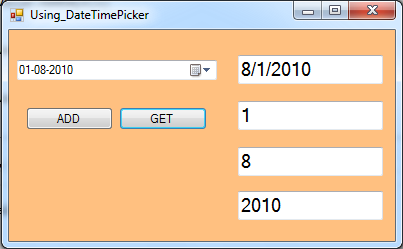
Use DateTimePicker In Visual Basic .Net


VB.Net Show Date From MySQL To DateTimePicker

How To Display Date From MySQL DataBase To DateTimePicker In VbNet

VB.Net Display Date From MySQL Database To DateTimePicker

In This VB.Net Tutorial  We Will See How To Get Date From MySQL DataBase And Set It Into A DateTimePicker Using MySqlDataReader And Custom The Date Format Using  CustomFormat In Visual Basic.Net Programming Language And Visual Studio Editor.


Project Source Code:

Imports MySql.Data.MySqlClient

Public Class Display_Date_From_MySQL_To_DateTimePicker

    Private Sub Display_Date_From_MySQL_To_DateTimePicker_Load(sender As Object, e As EventArgs) Handles MyBase.Load

        Dim connection As New MySqlConnection("datasource=localhost;port=3306;username=root;password=")
        Dim command As New MySqlCommand()

        command.CommandText = "SELECT `Id`, `FullName`, `Address`, `BirthDate` FROM s_t_d.student WHERE `Id` = 1"
        command.Connection = connection

        Dim reader As MySqlDataReader

        connection.Open()

        reader = command.ExecuteReader

        reader.Read()

        'DateTimePicker1.CustomFormat = "yyyy-MM-dd"
        DateTimePicker1.Value = reader(3)

        connection.Close()

    End Sub
End Class
      
///////////////OUTPUT:

VB.Net Display Date From MySQL Database To DateTimePicker