Affichage des articles dont le libellé est pdo. Afficher tous les articles

PHP CRUD Application with PDO and OOP

How to Create a CRUD Application with PHP, PDO, and OOP

How to Build a CRUD Application with PHP, PDO, and OOP


In this PHP tutorial we will see how to create a CRUD (Create, Read, Update, Delete) project with mysql database using PHP PDO and OOP (object oriented programming).

What We Will Use To Build This Project ? :
- PHP Programming Language.
- JavaScript Programming Language.
- HTML & CSS.
- VSCode Editor.
- MySQL Database.
- PhpMyAdmin.


Project Source Code:


------------ Create A Class "db_connect" To Connect Our Form With Database

This file establishes a connection to a MySQL database using PDO (PHP Data Objects). 
It sets up the connection parameters like the server name, username, password, and database name.

<?php

$servername = "localhost";
$username = "root";
$password = "";
$dbname = "products_manager";

try{
$conn = new PDO("mysql: host=$servername;dbname=$dbname", $username, $password);
$conn->setAttribute(PDO::ATTR_ERRMODE, PDO::ERRMODE_EXCEPTION);
}
catch(PDOException $ex){
echo"connection failed: " . $ex->getMessage();
die();
}

?>


------------ On The Index Page ------------

This file starts a PHP session, displays a form for searching, adding, editing, and removing products, and pre-populates form fields with product details if a search result is found in the session.

<?php

session_start();

?>

<!DOCTYPE html>
<html>
<head>
<title>Index</title>
<link rel="stylesheet" href="style.css">

</head>
<body>

<h1>CRUD POO</h1>
<div class="form-container">

<?php

$id = "";
$name = "";
$description = "";
$category = "";
$price = "";

if(isset($_SESSION['search-result']))
{
$product = $_SESSION['search-result'];
$id = $product['id'];
$name = $product['name'];
$description = $product['description'];
$category = $product['category'];
$price = $product['price'];
}

?>


<form action="functions.php" method="post">
<div class="search-container">
<input type="number" name="id" id="product-id" value="<?php echo $id ?>"
placeholder="id">
<input type="submit" name="search" value="Search" id="search-button">
</div>
<input type="text" name="name" id="product-name" value="<?php echo $name ?>"
placeholder="name">
<input type="text" name="category" id="product-category" value="<?php echo $category ?>"
placeholder="category">
<input type="text" name="description" id="product-description"
value="<?php echo $description ?>" placeholder="description">
<input type="text" name="price" id="product-price" value="<?php echo $price ?>"
placeholder="price">

<input type="submit" name="add" value="Add Product" id="add-button">
<input type="submit" name="edit" value="Edit Product" id="edit-button">
<input type="submit" name="remove" value="Remove Product" id="remove-button">
</form>
</div>

<?php

unset($_SESSION['search-result'])
?>

</body>

</html>


------------ The Product Class ------------

This file defines a Product class with private properties for product details such as name, description, category, and price. 
This class provides methods to save new products to the database, update existing product records, remove products from the database, and search for products by their unique ID.

<?php

// Including the required database connection file
require_once 'db_connect.php';

// Class definition for the Product entity
class Product
{
private $name;
private $description;
private $category;
private $price;

// Constructor to initialize the Product object with provided values
public function __construct($name, $description, $category, $price)
{
$this->name = $name;
$this->description = $description;
$this->category = $category;
$this->price = $price;
}

// Method to save the Product to the database
public function saveToDatabase()
{
global $conn;
$stmt = $conn->prepare("INSERT INTO `products2`(`name`, `category`, `description`, `price`)
VALUES (:name, :category, :description, :price)");
$stmt->bindParam(':name', $this->name);
$stmt->bindParam(':category', $this->category);
$stmt->bindParam(':description', $this->description);
$stmt->bindParam(':price', $this->price);

return $stmt->execute();
}

// Method to update the Product in the database
public function updateInDatabase($productId)
{
global $conn;
$stmt = $conn->prepare("
UPDATE `products2` SET `name`=:name,`category`=:category,
`description`=:description,`price`=:price WHERE `id`=:id");
$stmt->bindParam(':name', $this->name);
$stmt->bindParam(':category', $this->category);
$stmt->bindParam(':description', $this->description);
$stmt->bindParam(':price', $this->price);
$stmt->bindParam(':id', $productId);

return $stmt->execute();
}

// Static method to remove a Product from the database
public static function removeFromDatabase($productId)
{
global $conn;
$stmt = $conn->prepare("DELETE FROM `products2` WHERE `id`=:id");
$stmt->bindParam(':id', $productId);
return $stmt->execute();
}

// Static method to search for a Product by its ID
public static function searchById($productId)
{
global $conn;
$stmt = $conn->prepare("SELECT * FROM `products2` WHERE `id`=:id");
$stmt->bindParam(':id', $productId);
$stmt->execute();
return $stmt->fetch(PDO::FETCH_ASSOC);
}

}

?>

------------ The Functions File ------------

This file includes the Product class definition and the db_connect file and handles form submissions from the index page. 
If the "Add Product" button is clicked, it creates a new Product instance and saves it to the database. 
If the "Edit Product" button is clicked, it creates a new Product instance and updates the product in the database. 
If the "Remove Product" button is clicked, it removes the product from the database. 
If the "Search" button is clicked, it searches for a product by ID, stores the result in a session variable, and redirects back to the index page to display the search result.


<?php

require_once 'Product.php';

// Add a new product
if(isset($_POST['add']))
{
// Get product details from the form
$productName = $_POST['name'];
$productCategory = $_POST['category'];
$productDescription = $_POST['description'];
$productPrice = $_POST['price'];

// Create a new Product instance
$product = new Product($productName, $productDescription, $productCategory, $productPrice);

// Save the product to the database
if($product->saveToDatabase())
{
echo'product inserted';
}
else{
echo'product not inserted';
}
}

// Edit an existing product
if(isset($_POST['edit']))
{
// Get product details from the form
$productId = $_POST['id'];
$productName = $_POST['name'];
$productCategory = $_POST['category'];
$productDescription = $_POST['description'];
$productPrice = $_POST['price'];

// Create a new Product instance
$product = new Product($productName, $productDescription, $productCategory, $productPrice);

// Update the product in the database
if($product->updateInDatabase($productId))
{
echo'product updated';
}
else{
echo'product not updated';
}
}


// Remove a product
if(isset($_POST['remove']))
{
// Get the product ID from the form
$productId = $_POST['id'];

// Remove the product from the database
if(Product::removeFromDatabase($productId))
{
echo'product removed';
}
else{
echo'product not removed';
}
}


// Search for a product
if(isset($_POST['search']))
{
// Get the product ID from the form
$productId = $_POST['id'];
// Search for products by ID
$product = Product::searchById($productId);
// Start a session
session_start();
// Store the search result in a session variable
$_SESSION['search-result'] = $product;

/* $test = $_SESSION['search-result'];
echo $test['name'].'<br>';
echo $test['price']; */

// Redirect to the next page to display the search results in a form
header("Location: index.php");
exit();
}

?>


////// OUTPUT : 


How to Implement CRUD Operations with PDO and OOP in PHP


PHP And MySQL Tutorial : Insert Update Delete Search Using PDO In PHP

How To Insert Update Delete And Search Data From MySQL Database In PHP Using PDO  

_______________________________________________________


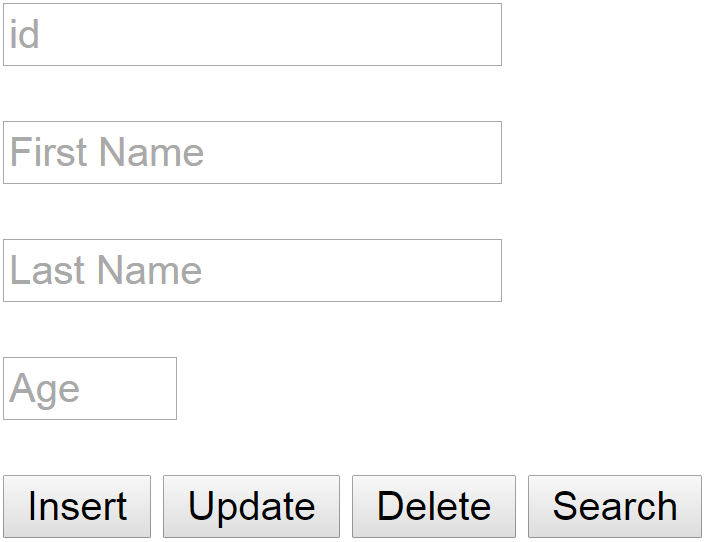
In this Php Tutorial we will see How To Add Edit Remove Find Data From MySQL Database Table In Php Using PDO  .
I Use In This Tutorial:
- NetBeans IDE .
- XAMPP .
- PhpMyAdmin .
-MySQL Database .


*INFO : Learn Php And Build Cms Project (Course) 


Part 1 


Part 2


Part 3


Php Source Code:

<?php

$dsn = 'mysql:host=localhost;dbname=test_db';
$username = 'root';
$password = '';

try{
    // Connect To MySQL Database
    $con = new PDO($dsn,$username,$password);
    $con->setAttribute(PDO::ATTR_ERRMODE, PDO::ERRMODE_EXCEPTION);
    
} catch (Exception $ex) {
    
    echo 'Not Connected '.$ex->getMessage();
    
}

$id = '';
$fname = '';
$lname = '';
$age = '';

function getPosts()
{
    $posts = array();
    
    $posts[0] = $_POST['id'];
    $posts[1] = $_POST['fname'];
    $posts[2] = $_POST['lname'];
    $posts[3] = $_POST['age'];
    
    return $posts;
}

//Search And Display Data 

if(isset($_POST['search']))
{
    $data = getPosts();
    if(empty($data[0]))
    {
        echo 'Enter The User Id To Search';
    }  else {
        
        $searchStmt = $con->prepare('SELECT * FROM users WHERE id = :id');
        $searchStmt->execute(array(
                    ':id'=> $data[0]
        ));
        
        if($searchStmt)
        {
            $user = $searchStmt->fetch();
            if(empty($user))
            {
                echo 'No Data For This Id';
            }
            
            $id    = $user[0];
            $fname = $user[1];
            $lname = $user[2];
            $age   = $user[3];
        }
        
    }
}

// Insert Data

if(isset($_POST['insert']))
{
    $data = getPosts();
    if(empty($data[1]) || empty($data[2]) || empty($data[3]))
    {
        echo 'Enter The User Data To Insert';
    }  else {
        
        $insertStmt = $con->prepare('INSERT INTO users(fname,lname,age) VALUES(:fname,:lname,:age)');
        $insertStmt->execute(array(
                    ':fname'=> $data[1],
                    ':lname'=> $data[2],
                    ':age'  => $data[3],
        ));
        
        if($insertStmt)
        {
                echo 'Data Inserted';
        }
        
    }
}

//Update Data

if(isset($_POST['update']))
{
    $data = getPosts();
    if(empty($data[0]) || empty($data[1]) || empty($data[2]) || empty($data[3]))
    {
        echo 'Enter The User Data To Update';
    }  else {
        
        $updateStmt = $con->prepare('UPDATE users SET fname = :fname, lname = :lname, age = :age WHERE id = :id');
        $updateStmt->execute(array(
                    ':id'=> $data[0],
                    ':fname'=> $data[1],
                    ':lname'=> $data[2],
                    ':age'  => $data[3],
        ));
        
        if($updateStmt)
        {
                echo 'Data Updated';
        }
        
    }
}

// Delete Data

if(isset($_POST['delete']))
{
    $data = getPosts();
    if(empty($data[0]))
    {
        echo 'Enter The User ID To Delete';
    }  else {
        
        $deleteStmt = $con->prepare('DELETE FROM users WHERE id = :id');
        $deleteStmt->execute(array(
                    ':id'=> $data[0]
        ));
        
        if($deleteStmt)
        {
                echo 'User Deleted';
        }
        
    }
}

?>

<!DOCTYPE html>
<html>
    <head>
        <title>PHP (MySQL PDO): Insert, Update, Delete, Search</title>  
    </head>
    <body>
        <form action="php_mysql_insert_update_delete_search.php" method="POST">

            <input type="text" name="id" placeholder="id" value="<?php echo $id;?>"><br><br>
            <input type="text" name="fname" placeholder="First Name" value="<?php echo $fname;?>"><br><br>
            <input type="text" name="lname" placeholder="Last Name" value="<?php echo $lname;?>"><br><br>
            <input type="number" min="10" max="100" name="age" placeholder="Age" value="<?php echo $age;?>"><br><br>
            
            <input type="submit" name="insert" value="Insert">
            <input type="submit" name="update" value="Update">
            <input type="submit" name="delete" value="Delete">
            <input type="submit" name="search" value="Search">

        </form>
        
    </body>    
</html>

OUTPUT:

php mysql insert update delete search
Php MySQL PDO Insert Update Delete Search


Php : How To Search And Filter Data In Html Table With Select Options Using Php And MySQL

Php How To Filter Data In Html Table Using Select Options In PHP And MySQL

_______________________________________________________


How To Search And Filter Data In Html Table With Select Options Using Php And MySQL


In this Php Tutorial we will see How To Search  Data From MySQL Database Table
 In Php Using PDO And Display It In Html Table With Select Options .
I Use In This Tutorial:
- NetBeans IDE .
- XAMPP .
- PhpMyAdmin .
-MySQL Database .


*INFO : Learn Php And Build Cms Project (Course) 


Part 1


Part 2


Php Source Code:

<?php

$dsn = 'mysql:host=localhost;dbname=test_db';
$username = 'root';
$password = '';

try{
    
    $con = new PDO($dsn, $username, $password);
    $con->setAttribute(PDO::ATTR_ERRMODE, PDO::ERRMODE_EXCEPTION);
    
} catch (Exception $ex) {

    echo 'Not Connected '.$ex->getMessage();
}

$tableContent = '';
$start = '';
$selectStmt = $con->prepare('SELECT * FROM users');
$selectStmt->execute();
$users = $selectStmt->fetchAll();

foreach ($users as $user)
{
    $tableContent = $tableContent.'<tr>'.
            '<td>'.$user['id'].'</td>'
            .'<td>'.$user['fname'].'</td>'
            .'<td>'.$user['lname'].'</td>'
            .'<td>'.$user['age'].'</td>';
}

if(isset($_POST['search']))
{
$start = $_POST['start'];
$tableContent = '';
$selectStmt = $con->prepare('SELECT * FROM users WHERE fname like :start OR lname like :start');
$selectStmt->execute(array(
        
         ':start'=>$start.'%'
    
));
$users = $selectStmt->fetchAll();

foreach ($users as $user)
{
    $tableContent = $tableContent.'<tr>'.
            '<td>'.$user['id'].'</td>'
            .'<td>'.$user['fname'].'</td>'
            .'<td>'.$user['lname'].'</td>'
            .'<td>'.$user['age'].'</td>';
}
    
}

?>

<!DOCTYPE html>
<html>
    <head>
        <title>Search & Display Using Selected Values</title>  
        <style>
            table,tr,td
            {
               border: 1px solid #000; 
            }
            
            td{
                background-color: #ddd;
            }
        </style>   
    </head>
    <body>
        
        <form action="table_selected_value.php" method="POST">
            <!-- 
For The First Time The Table Will Be Populated With All Data
But When You Choose An Option From The Select Options And Click The Find Button, The Table Will Be Populated With specific Data 
             -->
            <select name="start">
                <option value="">...</option>
                <option value="A" <?php if($start == 'A'){echo 'selected';}?>>A</option>
                <option value="B" <?php if($start == 'B'){echo 'selected';}?>>B</option>
                <option value="C" <?php if($start == 'C'){echo 'selected';}?>>C</option>
                <option value="D" <?php if($start == 'D'){echo 'selected';}?>>D</option>
                <option value="E" <?php if($start == 'E'){echo 'selected';}?>>E</option>
                <option value="F" <?php if($start == 'F'){echo 'selected';}?>>F</option>
            </select>
            
            <input type="submit" name="search" value="Find">
            
            <table>
                <tr>
                    <td>#ID</td>
                    <td>First Name</td>
                    <td>Last Name</td>
                    <td>Age</td>
                </tr>
                
                <?php
                
                echo $tableContent;
                
                ?>
                
            </table>
            
        </form>
        
    </body>    
</html>

OutPut :

php html table select option
PHP + MYSQL + HTML TABLE + SLECT OPTIONS