Affichage des articles dont le libellé est datagridview selected row. Afficher tous les articles

C# Show DataGridView Selected Row Data In Another Form

C# - How To Display DataGridView Selected Row Values On Another Form Using C#


In This C# Tutorial  We Will See How To Get And Show DataGridView  Selected Row Data To Another Form On GridView Click Using CSharp Programming Language.


Project Source Code:

using System;
using System.Collections.Generic;
using System.ComponentModel;
using System.Data;
using System.Drawing;
using System.Linq;
using System.Text;
using System.Threading.Tasks;
using System.Windows.Forms;

namespace WindowsFormsApplication1
{
    public partial class Form1 : Form
    {
        public Form1()
        {
            InitializeComponent();
        }

        private void Form1_Load(object sender, EventArgs e)
        {
            DataTable table = new DataTable();

            // add columns to datatable
            table.Columns.Add("Id", typeof(int));
            table.Columns.Add("First Name", typeof(string));
            table.Columns.Add("Last Name", typeof(string));
            table.Columns.Add("Age", typeof(int));

            // add rows to datatable
            table.Rows.Add(1, "First A", "Last A", 10);
            table.Rows.Add(2, "First B", "Last B", 20);
            table.Rows.Add(3, "First C", "Last C", 30);
            table.Rows.Add(4, "First D", "Last D", 40);
            table.Rows.Add(5, "First E", "Last E", 50);
            table.Rows.Add(6, "First F", "Last F", 60);
            table.Rows.Add(7, "First G", "Last G", 70);
            table.Rows.Add(8, "First H", "Last H", 80);

            dataGridView1.DataSource = table;

        }

        private void dataGridView1_Click(object sender, EventArgs e)
        {
            Form2 myForm = new Form2();

            myForm.TextBox1.Text = dataGridView1.CurrentRow.Cells[0].Value.ToString();
            myForm.TextBox2.Text = dataGridView1.CurrentRow.Cells[1].Value.ToString();
            myForm.TextBox3.Text = dataGridView1.CurrentRow.Cells[2].Value.ToString();
            myForm.TextBox4.Text = dataGridView1.CurrentRow.Cells[3].Value.ToString();

            myForm.ShowDialog();
        }
    }
}
      
///////////////OUTPUT:


c# display selected datagridview row data in another form


C# - How To Get Selected DataGridView Row Values Into InpuBoxes In C#

get selected datagridview row data

C# - How To Display Data From Selected DataGridView Row into InputBox Using C#


In This C# Code We Will See How To Get A DataGridView Row Values Into  InpuBoxes
In C# Programming Language.


Source Code:

using System;
using System.Collections.Generic;
using System.ComponentModel;
using System.Data;
using System.Drawing;
using System.Linq;
using System.Text;
using System.Threading.Tasks;
using System.Windows.Forms;
using Microsoft.VisualBasic;

namespace WindowsFormsApplication1
{
    public partial class Csharp_Show_DatagridView_Row_Data_In_InputBox : Form
    {
        public Csharp_Show_DatagridView_Row_Data_In_InputBox()
        {
            InitializeComponent();
        }

        DataTable table = new DataTable();

        private void Csharp_Show_DatagridView_Row_Data_In_InputBox_Load(object sender, EventArgs e)
        {
            // populate DatagridView with some data using datatable
            table.Columns.Add("Id", typeof(int));
            table.Columns.Add("First Name", typeof(String));
            table.Columns.Add("Last Name", typeof(String));
            table.Columns.Add("Age", typeof(int));

            table.Rows.Add(1, "AAA", "BBB", 32);
            table.Rows.Add(2, "CCC", "DDD", 23);
            table.Rows.Add(3, "EEE", "FFF", 16);
            table.Rows.Add(4, "GGG", "HHH", 45);
            table.Rows.Add(5, "III", "JJJ", 53);
            table.Rows.Add(6, "KKK", "LLL", 62);

            dataGridView1.DataSource = table;

        }

        // dataGridView Cell Click
        private void dataGridView1_CellClick(object sender, DataGridViewCellEventArgs e)
        {
            // get selected row index
            int selectedRowIndex = e.RowIndex;

            DataGridViewRow row = new DataGridViewRow();

            row = dataGridView1.Rows[selectedRowIndex];

            // get data from the selected row
            int id = int.Parse(row.Cells[0].Value.ToString());
            //string id2 = row.Cells[0].Value.ToString();
            string fn = row.Cells[1].Value.ToString();
            string ln = row.Cells[2].Value.ToString();
            int age = int.Parse(row.Cells[3].Value.ToString());

            // show the selected row data on inputboxes
            Interaction.InputBox("The Id", "Row Data", id.ToString(), -1, -1);
            Interaction.InputBox("The First Name", "Row Data", fn, -1, -1);
            Interaction.InputBox("The Last Name", "Row Data", ln, -1, -1);
            Interaction.InputBox("The Age", "Row Data", age.ToString(), -1, -1);
        }
    }
}
/////////////////////////// OUTPUT:

show datagridview selected row
datagridview selected row


VB.NET - Get Selected Row Values From DataGridView To InputBox In VB.NET

vb.net datagridview selected row

VB.NET - How To Show Selected Row Values From DataGridView To InputBox Using VB.NET


In This VB.NET Tutorial We Will See How To Displaying The Selected DataGridView Row Values In InpuBox Using VB.NET Programming Language.


Project Source Code:

Public Class VB_DataGridView_Row_Data_InputBox

    Dim table As New DataTable("Table")
    Private Sub VB_DataGridView_Row_Data_InputBox_Load(sender As Object, e As EventArgs) Handles MyBase.Load

        ' populate the datagridview using datatable
        table.Columns.Add("Id", Type.GetType("System.Int32"))
        table.Columns.Add("First Name", Type.GetType("System.String"))
        table.Columns.Add("Last Name", Type.GetType("System.String"))
        table.Columns.Add("Age", Type.GetType("System.Int32"))

        table.Rows.Add(1, "HJK", "KJH", 34)
        table.Rows.Add(2, "ERT", "IYT", 86)
        table.Rows.Add(3, "CVBN", "NBVC", 22)
        table.Rows.Add(4, "SDFGH", "HGFDS", 12)
        table.Rows.Add(5, "AZERTY", "YTREZA", 52)
        table.Rows.Add(6, "POIU", "UIOP", 31)
        table.Rows.Add(7, "AZSDFVB", "VCRTYUXA", 45)

        DataGridView1.DataSource = table

    End Sub

    Private Sub DataGridView1_CellClick(sender As Object, e As DataGridViewCellEventArgs) Handles DataGridView1.CellClick

        ' get selected DataGridView row index
        Dim selectedRowIndex As Integer

        selectedRowIndex = e.RowIndex

        Dim row As New DataGridViewRow()

        row = DataGridView1.Rows(selectedRowIndex)

        ' get the data from the row
        Dim id As String
        id = row.Cells(0).Value.ToString()

        Dim fn As String
        fn = row.Cells(1).Value.ToString()

        Dim ln As String
        ln = row.Cells(2).Value.ToString()

        Dim age As String
        age = row.Cells(3).Value.ToString()

        ' display row data in inputboxes
        InputBox("The Id", "Show Data", id)
        InputBox("The First Name", "Show Data", fn)
        InputBox("The Last Name", "Show Data", ln)
        InputBox("The Age", "Show Data", age)


    End Sub
End Class
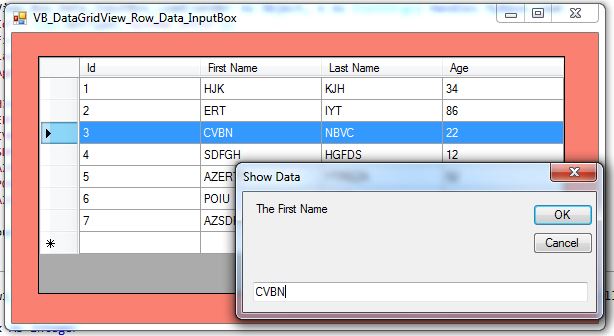
///////////////OUTPUT:
vb.net show datagridview row data in inputox
show datagridview row data in inputox