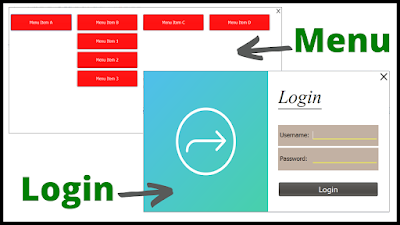
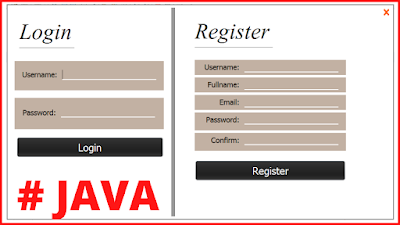
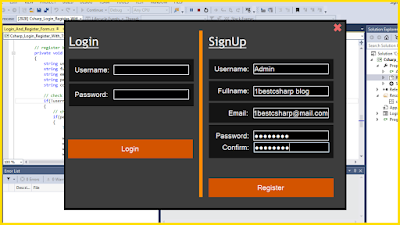
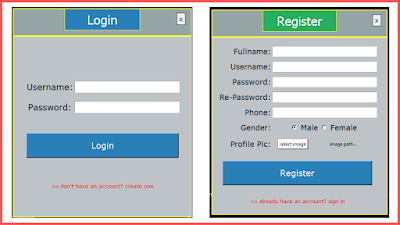
In This C# Tutorial We Will See How To Design a Login & Signup Form and Connect Those Two Forms With MySQL Database To Allow The Users To Create Their Account or To Access The Application Using C# Windows Form and Visual Studio Editor .
What We Are Gonna Use In This Project:
- Cshap Programming Language.
- Visual Studio Editor.
- xampp server.
- MySQL Database.
- PhpMyAdmin.
- Canva.com( to create the images )
What We Will Do In This Project:
- Design Two Forms For The Login and Register Using Panels, TextBoxes and Labels.
- Create Label To Close The Application On Click.
- Create a Class For The Connection With MySQL Database.
- Connect C# To MySQL Database, To Add The Created User Data In The Signup Form.
- Check If The User Leave Some Fields Empty or Filled With The PlaceHolder Data.
- Check if The Username Already Exists.
- Check If The User Enter a Wrong Password In The Confirmation Field.
WATCH THIS C# TUTORIAL
Project Source Code:
// ------ First We Need To Create a Class To Connect Our Application With The MySQL Database
using System;
using System.Collections.Generic;
using System.Linq;
using System.Text;
using System.Threading.Tasks;
using MySql.Data.MySqlClient;
namespace Csharp_Login_And_Register
{
/*
* we need to download the mysql connector
* add the connector to our project
* ( watch the video to see how )
* create a connection now with mysql
* open xampp and start mysql & apache
* go to phpmyadmin and create the users database
*/
class DB
{
// the connection
private MySqlConnection connection = new MySqlConnection("server=localhost;port=3306;username=root;password=;database=csharp_users_db");
// create a function to open the connection
public void openConnection()
{
if(connection.State == System.Data.ConnectionState.Closed)
{
connection.Open();
}
}
// create a function to close the connection
public void closeConnection()
{
if (connection.State == System.Data.ConnectionState.Open)
{
connection.Close();
}
}
// create a function to return the connection
public MySqlConnection getConnection()
{
return connection;
}
}
}
// ------ After Creating The Connection Class, Now We Need To Build a Register Form To Allow Users To Create Their Account
using System;
using System.Collections.Generic;
using System.ComponentModel;
using System.Data;
using System.Drawing;
using System.Linq;
using System.Text;
using System.Threading.Tasks;
using System.Windows.Forms;
using MySql.Data.MySqlClient;
namespace Csharp_Login_And_Register
{
public partial class RegisterForm : Form
{
public RegisterForm()
{
InitializeComponent();
}
private void RegisterForm_Load(object sender, EventArgs e)
{
// remove the focus from the textboxes by making a label the active control
this.ActiveControl = label1;
}
// textbox first name ENTER
private void textBoxFirstname_Enter(object sender, EventArgs e)
{
String fname = textBoxFirstname.Text;
if(fname.ToLower().Trim().Equals("first name"))
{
textBoxFirstname.Text = "";
textBoxFirstname.ForeColor = Color.Black;
}
}
// textbox first name LEAVE
private void textBoxFirstname_Leave(object sender, EventArgs e)
{
String fname = textBoxFirstname.Text;
if (fname.ToLower().Trim().Equals("first name") || fname.Trim().Equals(""))
{
textBoxFirstname.Text = "first name";
textBoxFirstname.ForeColor = Color.Gray;
}
}
// textbox last name ENTER
private void textBoxLastname_Enter(object sender, EventArgs e)
{
String lname = textBoxLastname.Text;
if (lname.ToLower().Trim().Equals("last name"))
{
textBoxLastname.Text = "";
textBoxLastname.ForeColor = Color.Black;
}
}
// textbox last name LEAVE
private void textBoxLastname_Leave(object sender, EventArgs e)
{
String lname = textBoxLastname.Text;
if (lname.ToLower().Trim().Equals("last name") || lname.Trim().Equals(""))
{
textBoxLastname.Text = "last name";
textBoxLastname.ForeColor = Color.Gray;
}
}
// textbox email ENTER
private void textBoxEmail_Enter(object sender, EventArgs e)
{
String email = textBoxEmail.Text;
if (email.ToLower().Trim().Equals("email address"))
{
textBoxEmail.Text = "";
textBoxEmail.ForeColor = Color.Black;
}
}
// textbox email LEAVE
private void textBoxEmail_Leave(object sender, EventArgs e)
{
String email = textBoxEmail.Text;
if (email.ToLower().Trim().Equals("email address") || email.Trim().Equals(""))
{
textBoxEmail.Text = "email address";
textBoxEmail.ForeColor = Color.Gray;
}
}
// textbox username ENTER
private void textBoxUsername_Enter(object sender, EventArgs e)
{
String username = textBoxUsername.Text;
if (username.ToLower().Trim().Equals("username"))
{
textBoxUsername.Text = "";
textBoxUsername.ForeColor = Color.Black;
}
}
// textbox username LEAVE
private void textBoxUsername_Leave(object sender, EventArgs e)
{
String username = textBoxUsername.Text;
if (username.ToLower().Trim().Equals("username") || username.Trim().Equals(""))
{
textBoxUsername.Text = "username";
textBoxUsername.ForeColor = Color.Gray;
}
}
// textbox password ENTER
private void textBoxPassword_Enter(object sender, EventArgs e)
{
String password = textBoxPassword.Text;
if (password.ToLower().Trim().Equals("password"))
{
textBoxPassword.Text = "";
textBoxPassword.UseSystemPasswordChar = true;
textBoxPassword.ForeColor = Color.Black;
}
}
// textbox password LEAVE
private void textBoxPassword_Leave(object sender, EventArgs e)
{
String password = textBoxPassword.Text;
if (password.ToLower().Trim().Equals("password") || password.Trim().Equals(""))
{
textBoxPassword.Text = "password";
textBoxPassword.UseSystemPasswordChar = false;
textBoxPassword.ForeColor = Color.Gray;
}
}
// textbox confirm password ENTER
private void textBoxPasswordConfirm_Enter(object sender, EventArgs e)
{
String cpassword = textBoxPasswordConfirm.Text;
if (cpassword.ToLower().Trim().Equals("confirm password"))
{
textBoxPasswordConfirm.Text = "";
textBoxPasswordConfirm.UseSystemPasswordChar = true;
textBoxPasswordConfirm.ForeColor = Color.Black;
}
}
// textbox confirm password LEAVE
private void textBoxPasswordConfirm_Leave(object sender, EventArgs e)
{
String cpassword = textBoxPasswordConfirm.Text;
if (cpassword.ToLower().Trim().Equals("confirm password") ||
cpassword.ToLower().Trim().Equals("password") ||
cpassword.Trim().Equals(""))
{
textBoxPasswordConfirm.Text = "confirm password";
textBoxPasswordConfirm.UseSystemPasswordChar = false;
textBoxPasswordConfirm.ForeColor = Color.Gray;
}
}
// label close CLICK
private void labelClose_Click(object sender, EventArgs e)
{
//this.Close();
Application.Exit();
}
// label close MOUSE ENTER
private void labelClose_MouseEnter(object sender, EventArgs e)
{
labelClose.ForeColor = Color.Black;
}
// label close MOUSE LEAVE
private void labelClose_MouseLeave(object sender, EventArgs e)
{
labelClose.ForeColor = Color.White;
}
// button signup
private void buttonCreateAccount_Click(object sender, EventArgs e)
{
// add a new user
DB db = new DB();
MySqlCommand command = new MySqlCommand("INSERT INTO `users`(`firstname`, `lastname`, `emailaddress`, `username`, `password`) VALUES (@fn, @ln, @email, @usn, @pass)", db.getConnection());
command.Parameters.Add("@fn", MySqlDbType.VarChar).Value = textBoxFirstname.Text;
command.Parameters.Add("@ln", MySqlDbType.VarChar).Value = textBoxLastname.Text;
command.Parameters.Add("@email", MySqlDbType.VarChar).Value = textBoxEmail.Text;
command.Parameters.Add("@usn", MySqlDbType.VarChar).Value = textBoxUsername.Text;
command.Parameters.Add("@pass", MySqlDbType.VarChar).Value = textBoxPassword.Text;
// open the connection
db.openConnection();
// check if the textboxes contains the default values
if (!checkTextBoxesValues())
{
// check if the password equal the confirm password
if(textBoxPassword.Text.Equals(textBoxPasswordConfirm.Text))
{
// check if this username already exists
if (checkUsername())
{
MessageBox.Show("This Username Already Exists, Select A Different One","Duplicate Username",MessageBoxButtons.OKCancel,MessageBoxIcon.Error);
}
else
{
// execute the query
if (command.ExecuteNonQuery() == 1)
{
MessageBox.Show("Your Account Has Been Created","Account Created",MessageBoxButtons.OK,MessageBoxIcon.Information);
}
else
{
MessageBox.Show("ERROR");
}
}
}
else
{
MessageBox.Show("Wrong Confirmation Password","Password Error",MessageBoxButtons.OKCancel,MessageBoxIcon.Error);
}
}
else
{
MessageBox.Show("Enter Your Informations First","Empty Data",MessageBoxButtons.OKCancel,MessageBoxIcon.Error);
}
// close the connection
db.closeConnection();
}
// check if the username already exists
public Boolean checkUsername()
{
DB db = new DB();
String username = textBoxUsername.Text;
DataTable table = new DataTable();
MySqlDataAdapter adapter = new MySqlDataAdapter();
MySqlCommand command = new MySqlCommand("SELECT * FROM `users` WHERE `username` = @usn", db.getConnection());
command.Parameters.Add("@usn", MySqlDbType.VarChar).Value = username;
adapter.SelectCommand = command;
adapter.Fill(table);
// check if this username already exists in the database
if (table.Rows.Count > 0)
{
return true;
}
else
{
return false;
}
}
// check if the textboxes contains the default values
public Boolean checkTextBoxesValues()
{
String fname = textBoxFirstname.Text;
String lname = textBoxLastname.Text;
String email = textBoxEmail.Text;
String uname = textBoxUsername.Text;
String pass = textBoxPassword.Text;
if(fname.Equals("first name") || lname.Equals("last name") ||
email.Equals("email address") || uname.Equals("username")
|| pass.Equals("password"))
{
return true;
}
else
{
return false;
}
}
// label go to the login form MOUSE ENTER
private void labelGoToLogin_MouseEnter(object sender, EventArgs e)
{
labelGoToLogin.ForeColor = Color.Yellow;
}
// label go to the login form MOUSE LEAVE
private void labelGoToLogin_MouseLeave(object sender, EventArgs e)
{
labelGoToLogin.ForeColor = Color.White;
}
// label go to the login form CLICK
private void labelGoToLogin_Click(object sender, EventArgs e)
{
this.Hide();
LoginForm loginform = new LoginForm();
loginform.Show();
}
}
}
// ------ After The User Have Created His Acoount, He Need To Login To The Application, So Let's Create The Login Form.
using MySql.Data.MySqlClient;
using System;
using System.Collections.Generic;
using System.ComponentModel;
using System.Data;
using System.Drawing;
using System.Linq;
using System.Text;
using System.Threading.Tasks;
using System.Windows.Forms;
namespace Csharp_Login_And_Register
{
public partial class LoginForm : Form
{
public LoginForm()
{
InitializeComponent();
// set the autosize for the password to false
this.textBoxPassword.AutoSize = false;
// set the the height of the password to 50
this.textBoxPassword.Size = new Size(this.textBoxPassword.Size.Width, 50);
}
// label close MOUSE ENTER
private void labelClose_MouseEnter(object sender, EventArgs e)
{
labelClose.ForeColor = Color.Black;
}
// label close MOUSE LEAVE
private void labelClose_MouseLeave(object sender, EventArgs e)
{
labelClose.ForeColor = Color.White;
}
// label close CLICK
private void labelClose_Click(object sender, EventArgs e)
{
//this.Close();
Application.Exit();
}
// button login
private void buttonLogin_Click(object sender, EventArgs e)
{
DB db = new DB();
String username = textBoxUsername.Text;
String password = textBoxPassword.Text;
DataTable table = new DataTable();
MySqlDataAdapter adapter = new MySqlDataAdapter();
MySqlCommand command = new MySqlCommand("SELECT * FROM `users` WHERE `username` = @usn and `password` = @pass", db.getConnection());
command.Parameters.Add("@usn", MySqlDbType.VarChar).Value = username;
command.Parameters.Add("@pass", MySqlDbType.VarChar).Value = password;
adapter.SelectCommand = command;
adapter.Fill(table);
// check if the user exists or not
if (table.Rows.Count > 0)
{
this.Hide();
MainForm mainform = new MainForm();
mainform.Show();
}
else
{
// check if the username field is empty
if(username.Trim().Equals(""))
{
MessageBox.Show("Enter Your Username To Login","Empty Username",MessageBoxButtons.OK,MessageBoxIcon.Error);
}
// check if the password field is empty
else if (password.Trim().Equals(""))
{
MessageBox.Show("Enter Your Password To Login", "Empty Password", MessageBoxButtons.OK, MessageBoxIcon.Error);
}
// check if the username or the password don't exist
else
{
MessageBox.Show("Wrong Username Or Password", "Wrong Data", MessageBoxButtons.OK, MessageBoxIcon.Error);
}
}
}
// label go to signup CLICK
private void labelGoToSignUp_Click(object sender, EventArgs e)
{
this.Hide();
RegisterForm registerform = new RegisterForm();
registerform.Show();
}
// label go to signup MOUSE ENTER
private void labelGoToSignUp_MouseEnter(object sender, EventArgs e)
{
labelGoToSignUp.ForeColor = Color.Yellow;
}
// label go to signup MOUSE LEAVE
private void labelGoToSignUp_MouseLeave(object sender, EventArgs e)
{
labelGoToSignUp.ForeColor = Color.White;
}
}
}
OUTPUT:
 |
| Register Form |
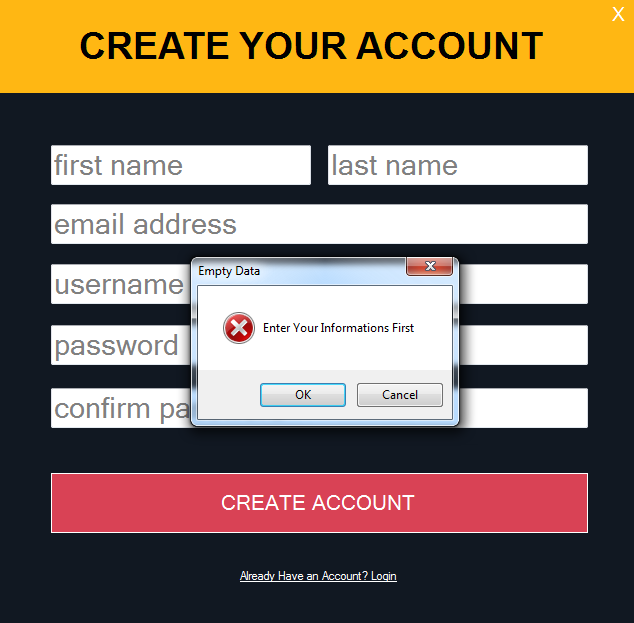 |
| Error Message If The Fields Are Empty |
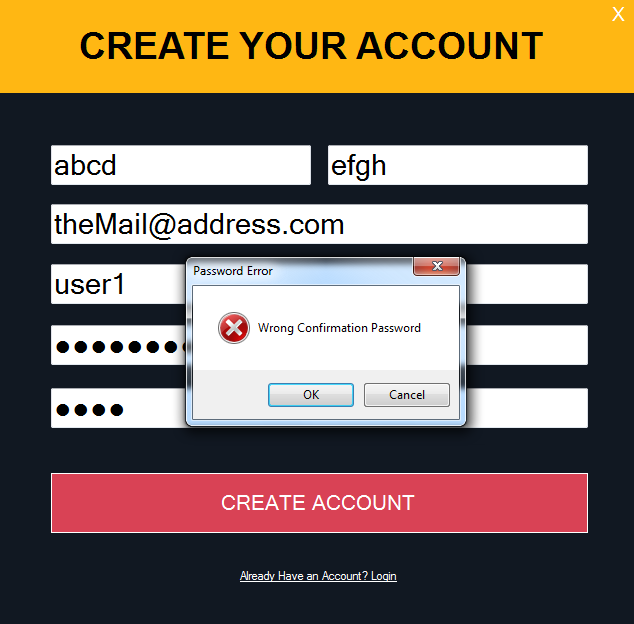 |
| Error Message If The User Enter a Different Password In The Confirmation |
 |
| Error Message If The User Select a Username That Already Exists In The Database |
 |
| Message If The Account Is Created Successfully |
 |
| Login Form |
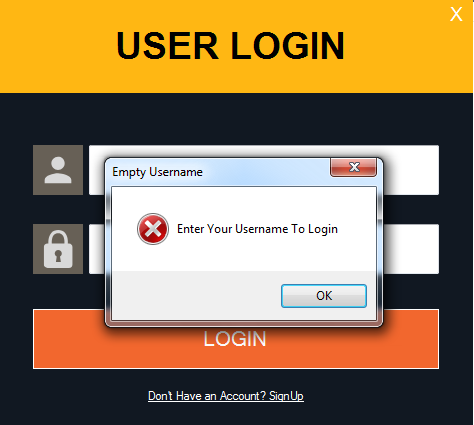 |
| Error Message - For Empty Username |
 |
| Error Message - For Empty Password |
 |
| Error Message If The User Enter a Username Or/And Password That Doesn't Exist |
 |
| a Form That Show Up When The User Login Successfully |
if you want the source code click on the download button below