Affichage des articles dont le libellé est ListBox. Afficher tous les articles

VB.Net Populate ListBox With MySQL Data

How To Fill A ListBox From MySQL DataBase In VbNet

Fill ListBox From MySQL DataBase In VB.Net

In This VB.Net Tutorial  We Will See How To Add Data From MySQL DataBase Into A ListBox Using DataTable In Visual Basic.Net Programming Language And Visual Studio Editor.


Project Source Code:

Imports MySql.Data.MySqlClient

Public Class Populate_ListBox_From_MySQL

    Private Sub Populate_ListBox_From_MySQL_Load(sender As Object, e As EventArgs) Handles MyBase.Load

        Dim connection As New MySqlConnection("datasource=localhost;port=3306;username=root;password=")
        Dim adapter As New MySqlDataAdapter("SELECT `Id`, `FullName`, `Address`, `BirthDate` FROM s_t_d.student", connection)
        Dim table As New DataTable()
        adapter.Fill(table)

        ListBox1.DataSource = table
        ListBox1.ValueMember = "Id"
        ListBox1.DisplayMember = "FullName"


    End Sub
End Class
      
///////////////OUTPUT:

VBNET ListBox With Data From MySQL


VB.Net Move ListBox Item Up And Down

How To Move Selected ListBox Item Up N Down In Visual Basic.Net 

VB.Net Move Selected ListBox Item Up And Down

In This VB.Net Tutorial  We Will See How To Move Selected ListBox Element Up Or Down On Button ClickIn Visual Basic.Net Programming Language And Visual Studio Editor.


Project Source Code:

Public Class listbox_item_up_down

    Private Sub ButtonUP_Click(sender As Object, e As EventArgs) Handles ButtonUP.Click

        Dim i As Integer
        i = ListBox1.SelectedIndex

        Dim item As String
        item = ListBox1.SelectedItem.ToString()

        If i > 0 Then

            ListBox1.Items.RemoveAt(i)
            ListBox1.Items.Insert(i - 1, item)
            ListBox1.SetSelected(i - 1, True)

        End If

    End Sub

    Private Sub ButtonDOWN_Click(sender As Object, e As EventArgs) Handles ButtonDOWN.Click

        Dim i As Integer
        i = ListBox1.SelectedIndex

        Dim item As String
        item = ListBox1.SelectedItem.ToString()

        If i < ListBox1.Items.Count - 1 Then

            ListBox1.Items.RemoveAt(i)
            ListBox1.Items.Insert(i + 1, item)
            ListBox1.SetSelected(i + 1, True)

        End If

    End Sub
End Class
      
///////////////OUTPUT:


VBnet Move Selected ListBox Item Up N Down


VB.Net - Using ListBox Control

VB.NET - How To Add,Edit, Remove Items From ListBox From Using Visual Basic .Net


In This VB.NET Tutorial We Will See How To Insert,Update,Delete Listbox Selected Item Using Visual Basic .NET Programming Language.


Project Source Code:

Public Class VBNET_ListBox

    Private Sub BTN_ADD_Click(sender As Object, e As EventArgs) Handles BTN_ADD.Click

        ListBox1.Items.Add(TextBox1.Text)

    End Sub

    Private Sub BTN_REMOVE_Click(sender As Object, e As EventArgs) Handles BTN_REMOVE.Click

        ListBox1.Items.RemoveAt(ListBox1.SelectedIndex())

    End Sub

    Private Sub BTN_UPDATE_Click(sender As Object, e As EventArgs) Handles BTN_UPDATE.Click

        Dim index As Integer = ListBox1.SelectedIndex
        ListBox1.Items.RemoveAt(index)

        ListBox1.Items.Insert(index, TextBox1.Text)

    End Sub

    Private Sub ListBox1_Click(sender As Object, e As EventArgs) Handles ListBox1.Click

        TextBox1.Text = ListBox1.SelectedItem.ToString()

    End Sub

    Private Sub BTN_ADD_ARRAY_Click(sender As Object, e As EventArgs) Handles BTN_ADD_ARRAY.Click

        Dim items() As String = {"VB.NET",
                                 "C#",
                                 "C",
                                 "C++",
                                 "Java",
                                 "PHP",
                                 "JavaScript",
                                 "Python",
                                 "Ruby",
                                 "IOS",
                                 "Android",
                                 "SQL",
                                 "Swift"}

        ListBox1.Items.AddRange(items)

    End Sub

    Private Sub BTN_RemoveAll_Click(sender As Object, e As EventArgs) Handles BTN_RemoveAll.Click

        ListBox1.Items.Clear()

    End Sub
End Class

///////////////OUTPUT:


Populate ListBox From Database In Vb.Net

VB.NET - How To Fill ListBox From SQL Server Using Visual Basic .Net

vb.net listbox and sql server


In This VB.NET Tutorial We Will See How To Display Database Data Into Listbox Using Microsoft SQL DataBase And Visual Basic .NET Programming Language.


Project Source Code:

Imports System.Data.SqlClient

Public Class VBNET_ListBox_Items_From_SQL

    Dim connection As New SqlConnection("Server= SAMSNG-PC; Database = TestDB; Integrated Security = true")

    Private Sub VBNET_ListBox_Items_From_SQL_Load(sender As Object, e As EventArgs) Handles MyBase.Load

        Dim command As New SqlCommand("select * from Users")
        command.Connection = connection

        Dim adapter As New SqlDataAdapter(command)
        Dim table As New DataTable()

        adapter.Fill(table)

        ListBox1.DataSource = table

        ListBox1.DisplayMember = "age"
        ListBox1.ValueMember = "Id"


    End Sub
End Class

///////////////OUTPUT:

vb.net listbox and database


C# Update ListBox Item

How To Update ListBox Selected Item In C#


In This C# Tutorial We Will See How To Display Selected Listbox Item Into TextBox And Edit It With A New Value From The TextBox Using CSharp Programming Language And .

Source Code :

using System;
using System.Collections.Generic;
using System.ComponentModel;
using System.Data;
using System.Drawing;
using System.Linq;
using System.Text;
using System.Threading.Tasks;
using System.Windows.Forms;

namespace WindowsFormsApplication1
{
    public partial class ListBox_Form : Form
    {
        public ListBox_Form()
        {
            InitializeComponent();
        }

        private void listBox1_SelectedIndexChanged(object sender, EventArgs e)
        {
            try
            {
                textBox1.Text = listBox1.SelectedItem.ToString();
            }catch
            {

            }      
        }

        private void BTN_UPDATE_Click(object sender, EventArgs e)
        {
            int index = listBox1.SelectedIndex;
            listBox1.Items.RemoveAt(index);
            listBox1.Items.Insert(index, textBox1.Text);
        }
    }
}

=> OutPut :


c# edit listbox selected item


C# Add Remove Item From ListBox And Move Items


c# listbox item

C# - How To Add And Remove Item From ListBox And Move Items Up And Down


In This C# Tutorial  We Will See How To Insert Using TextBox , ComboBox And Delete Item From ListBox And Moving Item Up N Down Using CSharp Programming Language.


Project Source Code:


using System;
using System.Collections.Generic;
using System.ComponentModel;
using System.Data;
using System.Drawing;
using System.Linq;
using System.Text;
using System.Threading.Tasks;
using System.Windows.Forms;

namespace Csharp_And_MySQL
{
    public partial class Csharp_ListBox : Form
    {
        public Csharp_ListBox()
        {
            InitializeComponent();
        }

        private void BTN_ADD_Click(object sender, EventArgs e)
        {
            // add item to listbox from textbox
            listBox1.Items.Add(textBox1.Text);

           // add item to listbox from combobox
            listBox1.Items.Add(comboBox1.SelectedItem.ToString());
        }

         // button move selected listbox item up
        private void BTN_UP_Click(object sender, EventArgs e)
        {

            int i = listBox1.SelectedIndex;

            string item = listBox1.SelectedItem.ToString();
            if(i > 0)
            {
                listBox1.Items.RemoveAt(i);
                listBox1.Items.Insert(i - 1, item);
                listBox1.SetSelected(i - 1, true);
            }
         
        }

        // button move selected listbox item down
        private void BTN_DOWN_Click(object sender, EventArgs e)
        {
            int i = listBox1.SelectedIndex;

            string item = listBox1.SelectedItem.ToString();
            if (i < listBox1.Items.Count -1 )
            {
                listBox1.Items.RemoveAt(i);
                listBox1.Items.Insert(i + 1, item);
                listBox1.SetSelected(i + 1, true);
            }
        }

    }
}


///////////////OUTPUT:


c# listbox move item


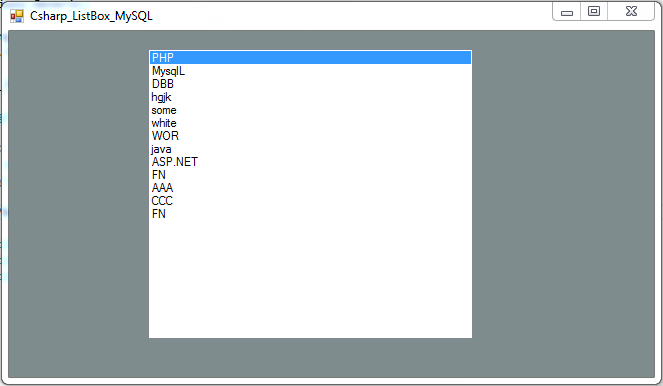
C# - How To Bind ListBox From MySQL Database In C#

C# - How To Fill ListBox From MySQL Dataase In C#

__________________________________________________________________________

In This C# Tutorial We Will See How To A ListBox With MySQL Database Data
In CSharp Programming Language .


Source Code:


using System;
using System.Collections.Generic;
using System.ComponentModel;
using System.Data;
using System.Drawing;
using System.Linq;
using System.Text;
using System.Threading.Tasks;
using System.Windows.Forms;
using MySql.Data.MySqlClient;

namespace Csharp_And_MySQL
{
    public partial class Csharp_ListBox_MySQL : Form
    {

        MySqlConnection connection = new MySqlConnection("datasource=localhost;port=3306;username=root;password=");
        MySqlDataAdapter adapter;
        DataTable table = new DataTable();

        public Csharp_ListBox_MySQL()
        {
            InitializeComponent();
        }

        private void Csharp_ListBox_MySQL_Load(object sender, EventArgs e)
        {
            adapter = new MySqlDataAdapter("SELECT * FROM test_db.users",connection);
            adapter.Fill(table);
            listBoxData.DataSource = table;
            listBoxData.DisplayMember = "fname";
            listBoxData.ValueMember = "id";
        }
    }
}

=> OUTPUT :

c# listbox data from mysql
c# listbox items from mysql database