Affichage des articles dont le libellé est Collection. Afficher tous les articles

JAVA & MySQL - How To Bind JTable From MySQL DataBase Using ArrayList In Java NetBeans

Populating JTable From MySQL DataBase Using ArrayList In Java NetBeans


In this java Tutorial we will see How To Fill data Into JTable from Mysql  database
using ArrayList In Java NetBeans .

maybe you need to see:
   - connect java to mysql.
   - using ArrayList.


Project Source Code:

package javaapp;

import java.awt.BorderLayout;
import java.sql.Connection;
import java.sql.DriverManager;
import java.sql.ResultSet;
import java.sql.SQLException;
import java.sql.Statement;
import java.util.ArrayList;
import java.util.logging.Level;
import java.util.logging.Logger;
import javax.swing.JFrame;
import javax.swing.JPanel;
import javax.swing.JScrollPane;
import javax.swing.JTable;
import javax.swing.table.DefaultTableModel;

// create a users class
class Users{
    
    private int Id;
    private String Fname;
    private String Lname;
    private int Age;
    
    public Users(int id,String fname,String lname,int age){
        this.Id = id;
        this.Fname = fname;
        this.Lname = lname;
        this.Age = age;
    }
    
    public int getId(){
        return this.Id;
    }
    
    public String getFname(){
        return this.Fname;
    }
    
    public String getLname(){
        return this.Lname;
    }
    
    public int getAge(){
        return this.Age;
    } 
}

public class Work extends JFrame {
    
    public Work(){
        
        super("Bind JTable From MySQL DataBase");
        
        setLocationRelativeTo(null);
        
        setSize(600,400);
        
        setDefaultCloseOperation(JFrame.EXIT_ON_CLOSE);
        
        setVisible(true);
    }

 // create a Function to get the connection
    static Connection getConnection(){
        Connection con = null;
        
        try {
            con = DriverManager.getConnection("jdbc:mysql://localhost/test_db","root","");
        } catch (SQLException ex) {
            Logger.getLogger(Work.class.getName()).log(Level.SEVERE, null, ex);
        }
        
        return con;
    }
    
 // create a function to fill the an arraylist from database
    static ArrayList<Users> getUsers(){
        
        ArrayList<Users> users = new ArrayList<Users>();
        
        Connection con = getConnection();
        
        Statement st;
        
        ResultSet rs;
        
        Users u;
        
        try {
            
            st = con.createStatement();
            rs = st.executeQuery("SELECT * FROM users");
            
            while(rs.next()){
                
                u = new Users(
                        rs.getInt("id"),
                        rs.getString("fname"),
                        rs.getString("lname"),
                        rs.getInt("age")
                );
                
                users.add(u);
            }
             
        } catch (SQLException ex) {
            Logger.getLogger(Work.class.getName()).log(Level.SEVERE, null, ex);
        }

        return users;
    }
    
    
    public static void main(String[] args){

 /*
   now we are gonna create and populate a jtable from the arraylist who is populated from mysql database
*/
    
        JTable table = new JTable();
        
        DefaultTableModel model = new DefaultTableModel();
        
        Object[] columnsName = new Object[4];
        
        columnsName[0] = "Id";
        columnsName[1] = "Fname";
        columnsName[2] = "Lname";
        columnsName[3] = "Age";
        
        model.setColumnIdentifiers(columnsName);
        
        Object[] rowData = new Object[4];
        
        for(int i = 0; i < getUsers().size(); i++){
            
            rowData[0] = getUsers().get(i).getId();
             rowData[1] = getUsers().get(i).getFname();
              rowData[2] = getUsers().get(i).getLname();
               rowData[3] = getUsers().get(i).getAge();
               
               model.addRow(rowData);
        }
        
        table.setModel(model);
        
//        System.out.println(getUsers().size());
        
        Work window = new Work();
        
        JPanel panel = new JPanel();
        
        panel.setLayout(new BorderLayout());
        
        JScrollPane pane = new JScrollPane(table);
        
        panel.add(pane,BorderLayout.CENTER);
        
        window.setContentPane(panel);
    }
}
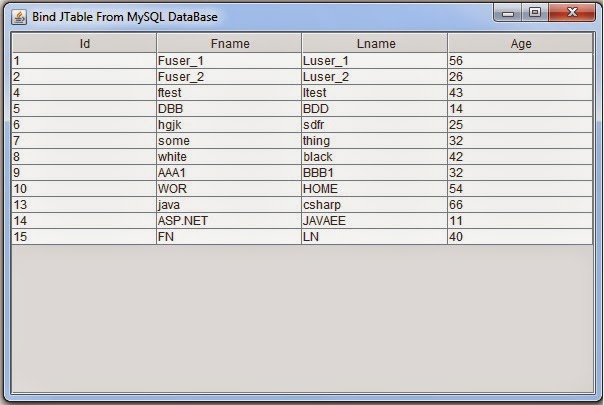
///////////////OUTPUT:

Populating JTable From MySQL DataBase Using ArrayList In Java
JTable Populated
You can also See -> Fill JTable From Mysql DataBas Using Vector


JAVA - How To Populate a LinkedList From MySQL DataBase In Java

JAVA - How To Get Data From MySQL Database To LinkedList In Java


java linkedlist with mysql database

In this java Collection Tutorial we will see How To retrieve data from MySQL database
using LinkedList In Java NetBeans .

maybe you need to see:
   - connect java to mysql.
   - using LinkedList.


Project Source Code:

package javaapp;

import java.sql.Connection;
import java.sql.DriverManager;
import java.sql.ResultSet;
import java.sql.SQLException;
import java.sql.Statement;
import java.util.LinkedList;
import java.util.logging.Level;
import java.util.logging.Logger;

// create a users class
class Users{
    private int Id;
    private String Fname;
    private String Lname;
    private int Age;
    
    public Users(){}
    public Users(int id, String fname,String lname,int age){
        this.Id = id;
        this.Fname = fname;
        this.Lname = lname;
        this.Age = age;
    }
    
    public int getId(){
        return this.Id;
    }
    
    public String getFname(){
        return this.Fname;
    }
    
       public String getLname(){
        return this.Lname;
    }
       
     public int getAge(){
        return this.Age;
    }
     
     // create a tostring methode to diplay data
     public String ToString(){
         return this.Id+" "+this.Fname+" "+this.Lname+" "+this.Age;
     }
}


public class Work {
   
    // create a methode to get the connection
    public static Connection getConnection(){
        
        Connection con = null;
        
        try {
            con = DriverManager.getConnection("jdbc:mysql://localhost/test_db", "root", "");
        } catch (SQLException ex) {
            Logger.getLogger(Work.class.getName()).log(Level.SEVERE, null, ex);
        }
        
        return con;
    }
    
    public static void main(String[] args){

        // create the linkedlist

        LinkedList<String> list = new LinkedList<String>();
        
        Users u;
        
        Connection con = getConnection();
        
        Statement st = null;
        ResultSet rs = null;
        
        try{
            st = con.createStatement();
            rs = st.executeQuery("SELECT * FROM users");
            while(rs.next()){
                Integer id = rs.getInt("id");
                String fname = rs.getString("fname");
                String lname = rs.getString("lname");
                int age = rs.getInt("age");
                
                u = new Users(id, fname,lname,age);
                
                // set data in the linkedlist with our tostring methode
                
                list.add(u.ToString());
            }
        }catch(Exception ex){
            ex.printStackTrace();
        }
        
        // display data from the LinkedList
        for(String s : list)
        System.out.println(s);
        
        // now your data are displayed from mysql database using LinkedList 
    }
}

///////////////OUTPUT:

1 Fuser_1 Luser_1 56
2 Fuser_2 Luser_2 26
4 ftest ltest 43
5 DBB BDD 14
6 hgjk sdfr 25
7 some thing 32
8 white black 42
9 AAA1 BBB1 32
10 WOR HOME 54
13 java csharp 66
14 ASP.NET JAVAEE 11
15 FN LN 40


JAVA - How To Populate a HashMap From MySQL DataBase In Java

JAVA - How To Get Data From MySQL Database To HashMap In Java


java hashmap mysql database

In this java Collection Tutorial we will see How To retrieve data from MySQL database
using HashMap In Java NetBeans .

maybe you need to see:
   - connect java to mysql.
   - using HashMap.


Project Source Code:

package javaapp;

import java.sql.Connection;
import java.sql.DriverManager;
import java.sql.ResultSet;
import java.sql.SQLException;
import java.sql.Statement;
import java.util.HashMap;
import java.util.logging.Level;
import java.util.logging.Logger;

// create a users class
class Users{
    private int Id;
    private String Fname;
    private String Lname;
    private int Age;
    
    public Users(){}
    public Users(int id, String fname,String lname,int age){
        this.Id = id;
        this.Fname = fname;
        this.Lname = lname;
        this.Age = age;
    }
    
    public int getId(){
        return this.Id;
    }
    
    public String getFname(){
        return this.Fname;
    }
    
       public String getLname(){
        return this.Lname;
    }
       
     public int getAge(){
        return this.Age;
    }
     
     // create a tostring method to diplay data
     public String ToString(){
         return this.Id+" "+this.Fname+" "+this.Lname+" "+this.Age;
     }
}


public class Work {
   
    // create a method to get the connection
    public static Connection getConnection(){
        
        Connection con = null;
        
        try {
            con = DriverManager.getConnection("jdbc:mysql://localhost/test_db", "root", "");
        } catch (SQLException ex) {
            Logger.getLogger(Work.class.getName()).log(Level.SEVERE, null, ex);
        }
        
        return con;
    }
    
    public static void main(String[] args){

        // create the hashmap
        HashMap<Integer,Users> map = new HashMap<Integer,Users>();
        
        Statement st = null;
        ResultSet rs = null;
        Connection con = getConnection();
        Users u;
        
        try{
            st = con.createStatement();
            rs = st.executeQuery("SELECT * FROM users");
            while(rs.next()){
                Integer id = rs.getInt("id");
                String fname = rs.getString("fname");
                String lname = rs.getString("lname");
                int age = rs.getInt("age");
                
                u = new Users(id, fname,lname,age);
                
                // set data in the hashmap
                map.put(id, u);
            }
        }catch(Exception ex){
            ex.printStackTrace();
        }
        
        // display data from the hashmap
        for(Integer i : map.keySet()){
            Users us = map.get(i);
            System.out.println(us.getId()+" "+us.getFname()+" "+us.getLname()+" "+us.getAge());
        }
        
        // show data from hashmap using our ToString Method
        System.out.println("______With ToString______");
        for(Integer i : map.keySet()){
            Users us = map.get(i);
            System.out.println(us.ToString());
        }
        
        // now your data are displayed from mysql database using hashmap 
    }
}

///////////////OUTPUT:
1 Fuser_1 Luser_1 56
2 Fuser_2 Luser_2 26
4 ftest ltest 43
5 DBB BDD 14
6 hgjk sdfr 25
7 some thing 32
8 white black 42
9 AAA1 BBB1 32
10 WOR HOME 54
13 java csharp 66
14 ASP.NET JAVAEE 11
15 FN LN 40
______With ToString______
1 Fuser_1 Luser_1 56
2 Fuser_2 Luser_2 26
4 ftest ltest 43
5 DBB BDD 14
6 hgjk sdfr 25
7 some thing 32
8 white black 42
9 AAA1 BBB1 32
10 WOR HOME 54
13 java csharp 66
14 ASP.NET JAVAEE 11
15 FN LN 40


JAVA - How To Use HashMap With Class In Java NetBeans

JAVA Collection - Using HashMap With Class As Value In Java NetBeans

                                                                                                                                                            
using hasmap with your own class in java


In this java Collection Code we will see How To Use HashMap With Our Class As Value In Java NetBeans 


Source Code:

package javaapp;

import java.util.HashMap;

 // Creat a class
   class User{
       private int id;
       private String name;
       
       public User(){}
       
       public User(int _id,String _name){
          this.id = _id;
          this.name =_name;
       }
       
       public int getId(){
           return this.id;
       }
       
       public String getName(){
           return this.name;
       }
       
       public void setId(int id){
           this.id = id;
       }
       
       public void setName(String name){
           this.name = name;
       }
       
// create a tostring methode
       public String ToString(){
           return "ID = "+id+"  NAME = "+name ;
       }
   }

public class Woirk {

    
    public static void main(String[] args){

        HashMap<Integer,User> userList = new HashMap<Integer,User>();

// filling the HashMap with put method
        userList.put(10, new User(1,"omar"));
         userList.put(21, new User(2,"bilal"));
          userList.put(32, new User(3,"kamal"));
           userList.put(43, new User(4,"rachid"));
            userList.put(54, new User(5,"rami"));
             userList.put(65, new User(6,"karim"));
             
// create another hashmap
      HashMap<Integer,User> userList2 = new HashMap<Integer,User>();
        userList2.put(53, new User(62,"khalid"));
          userList2.put(25, new User(18,"mounir"));
          
// replace element in hashmap
        userList.replace(10, new User(100,"tarik"), new User(1,"omar"));

        // insert a map elements in another map
        userList.putAll(userList2);

        printAllData(userList);

        userList.remove(3);
        
        printAllData(userList);
          
        User u = userList.replace(10, new User(8,"morad"));
        
        printAllData(userList);
        
        userList.put(400,null);

/*
       If the specified key is not associated with a value
       or the value is null associates it with the given value                        in this example  the key is 400 and value is null
*/
        userList.putIfAbsent(400, new User(19,"TEXT"));
      
        printAllData(userList);
        
       User us = userList.getOrDefault(400,null);
       System.out.println(us.ToString());
     

      User u1 = userList.get(54);
      User u2 = new User(600, "TheNewUser");
  
    System.out.println("---------------------");
    printAllData(userList);
   userList.remove(54, u1);
       printAllData(userList);
   
    System.out.println("Size: "+userList.size());
    userList.clear();
    System.out.println("The userList is Empty: "+userList.isEmpty());
  }  
    
    // method to print hashmap data
    public static void printAllData(HashMap<Integer,User> list){
      for(Integer i : list.keySet())
        {
          System.out.println(list.get(i).ToString());
        }
      System.out.println("----------------------");
    }
    
 // method to print hashmap keys
    public static void printKeys(HashMap<Integer,User> list){
      for(Integer i : list.keySet())
        {
          System.out.println(i);
        }
      System.out.println("----------------------");
    } 
}

//OUTPUT:

ID = 3  NAME = kamal
ID = 6  NAME = karim
ID = 2  NAME = bilal
ID = 62  NAME = khalid
ID = 5  NAME = rami
ID = 18  NAME = mounir
ID = 1  NAME = omar
ID = 4  NAME = rachid
----------------------
ID = 3  NAME = kamal
ID = 6  NAME = karim
ID = 2  NAME = bilal
ID = 62  NAME = khalid
ID = 5  NAME = rami
ID = 18  NAME = mounir
ID = 1  NAME = omar
ID = 4  NAME = rachid
----------------------
ID = 3  NAME = kamal
ID = 6  NAME = karim
ID = 2  NAME = bilal
ID = 62  NAME = khalid
ID = 5  NAME = rami
ID = 18  NAME = mounir
ID = 8  NAME = morad
ID = 4  NAME = rachid
----------------------
ID = 3  NAME = kamal
ID = 19  NAME = TEXT
ID = 6  NAME = karim
ID = 2  NAME = bilal
ID = 62  NAME = khalid
ID = 5  NAME = rami
ID = 18  NAME = mounir
ID = 8  NAME = morad
ID = 4  NAME = rachid
----------------------
ID = 19  NAME = TEXT
---------------------
ID = 3  NAME = kamal
ID = 19  NAME = TEXT
ID = 6  NAME = karim
ID = 2  NAME = bilal
ID = 62  NAME = khalid
ID = 5  NAME = rami
ID = 18  NAME = mounir
ID = 8  NAME = morad
ID = 4  NAME = rachid
----------------------
ID = 3  NAME = kamal
ID = 19  NAME = TEXT
ID = 6  NAME = karim
ID = 2  NAME = bilal
ID = 62  NAME = khalid
ID = 18  NAME = mounir
ID = 8  NAME = morad
ID = 4  NAME = rachid
----------------------
Size: 8
The userList is Empty: true