Affichage des articles dont le libellé est Words Count. Afficher tous les articles

VB.Net Words Count

How To Count Words In A String Using Visual Basic.Net 

words count in vb.net

In This VB.Net Tutorial  We Will See How To Count The Number Of Words In A TextBox Text Using Visual Basic.Net Programming Language And Visual Studio Editor.


Project Source Code:

Public Class VbWordsCount

    Private Sub Button1_Click(sender As Object, e As EventArgs) Handles Button1.Click

        Dim txt As String
        txt = TextBox1.Text

        Dim separ() As Char = {" "}

        Dim count As Integer

        count = txt.Split(separ, StringSplitOptions.RemoveEmptyEntries).Length

        MsgBox(count.ToString())


    End Sub
End Class


///////////////OUTPUT:
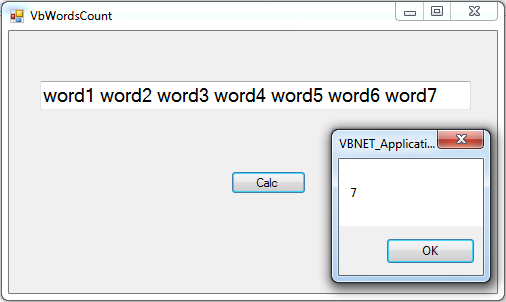


get string words count using vb.net


Java Words Count

How To Count Words In A String Using Java Netbeans

words count in java

In This Java Tutorial  We Will See How To Count The Number Of Words In A jTextField Text Using Java Programming Language And NetBeans Editor.

STEPS:
1 - the user enter text into the jtexfields
2 - the user click "count" button to display the number of words in the text.


Project Source Code:

private void jButtonCountActionPerformed(java.awt.event.ActionEvent evt) {                                             
        
        String txt = jTextField1.getText();
        String[] words = txt.split(Pattern.quote(" "));
        System.out.println(words.length);
        
    } 


///////////////OUTPUT:

number of words in a string using java
Result : 11


C# Words Count

How To Count Words In A String Using Csharp

words count in c#

In This C# Tutorial  We Will See How To Count The Number Of Words In A TextBox Text Using CSharp Programming Language And Visual Studio Editor.


Project Source Code:

using System;
using System.Collections.Generic;
using System.ComponentModel;
using System.Data;
using System.Drawing;
using System.Linq;
using System.Text;
using System.Threading.Tasks;
using System.Windows.Forms;

namespace WindowsFormsApplication1
{
    public partial class FormDATA : Form
    {
       
        public FormDATA()
        {
            InitializeComponent();
            
        }

        private void button1_Click(object sender, EventArgs e)
        {
            string txt = textBox1.Text;

            char[] separator = {' '};

            int wordsCount = txt.Split(separator, StringSplitOptions.RemoveEmptyEntries).Length;

            MessageBox.Show(wordsCount.ToString());
        }
    }
}


///////////////OUTPUT:


number of words using c#