VB.NET - How To Insert Update Search Delete Data From MySQL Using Visual Basic.Net

In This VB.Net Tutorial We Will See How To:
- Insert Data Into MySQL Database Table.
- Update Data From MySQL Database Table With A Specific ID.
- Delete Data From MySQL Database Table With A Specific ID.
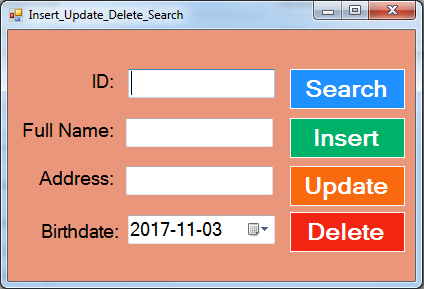
- Search Data In MySQL Database With A Specific ID And Display The Information Into TextBoxes And DateTimePicker ( if data exists )
Using Visual Basic.Net Programming Language And Visual Studio Editor.
- Insert Data Into MySQL Database Table.
- Update Data From MySQL Database Table With A Specific ID.
- Delete Data From MySQL Database Table With A Specific ID.
- Search Data In MySQL Database With A Specific ID And Display The Information Into TextBoxes And DateTimePicker ( if data exists )
Using Visual Basic.Net Programming Language And Visual Studio Editor.
Part 1
Part 2
Project Source Code:
Imports MySql.Data.MySqlClient
Public Class Insert_Update_Delete_Search
Dim connection As New MySqlConnection("datasource=localhost;port=3306;username=root;password=;database=s_t_d")
' button find
Private Sub ButtonSearch_Click(sender As Object, e As EventArgs) Handles ButtonSearch.Click
Dim search_command As New MySqlCommand("SELECT * FROM `student` WHERE `Id` = @id", connection)
search_command.Parameters.Add("@id", MySqlDbType.Int64).Value = TextBox1.Text
Dim adapter As New MySqlDataAdapter(search_command)
Dim table As New DataTable()
Try
adapter.Fill(table)
If table.Rows.Count > 0 Then
TextBox2.Text = table(0)(1)
TextBox3.Text = table(0)(2)
DateTimePicker1.Value = table(0)(3)
Else
TextBox2.Text = ""
TextBox3.Text = ""
DateTimePicker1.Value = Now()
MessageBox.Show("No Data Found")
End If
Catch ex As Exception
MessageBox.Show("ERROR")
End Try
End Sub
' function to execute the insert update delete commands
Function execCommand(ByVal cmd As MySqlCommand) As Boolean
If connection.State = ConnectionState.Closed Then
connection.Open()
End If
Try
If cmd.ExecuteNonQuery() = 1 Then
Return True
Else
Return False
End If
Catch ex As Exception
MessageBox.Show("ERROR")
Return False
End Try
If connection.State = ConnectionState.Open Then
connection.Close()
End If
End Function
' button add
Private Sub ButtonInsert_Click(sender As Object, e As EventArgs) Handles ButtonInsert.Click
Dim insert_command As New MySqlCommand("INSERT INTO `student`(`FullName`, `Address`, `BirthDate`) VALUES (@fln,@adds,@brd)", connection)
insert_command.Parameters.Add("@fln", MySqlDbType.VarChar).Value = TextBox2.Text
insert_command.Parameters.Add("@adds", MySqlDbType.VarChar).Value = TextBox3.Text
insert_command.Parameters.Add("@brd", MySqlDbType.Date).Value = DateTimePicker1.Value
If execCommand(insert_command) Then
MessageBox.Show("Data Inserted")
Else
MessageBox.Show("Data NOT Inserted")
End If
End Sub
' button edit
Private Sub ButtonUpdate_Click(sender As Object, e As EventArgs) Handles ButtonUpdate.Click
Dim update_command As New MySqlCommand("UPDATE `student` SET `FullName`=@fln,`Address`=@adds,`BirthDate`=@brd WHERE `Id` = @id", connection)
update_command.Parameters.Add("@id", MySqlDbType.Int64).Value = TextBox1.Text
update_command.Parameters.Add("@fln", MySqlDbType.VarChar).Value = TextBox2.Text
update_command.Parameters.Add("@adds", MySqlDbType.VarChar).Value = TextBox3.Text
update_command.Parameters.Add("@brd", MySqlDbType.Date).Value = DateTimePicker1.Value
If execCommand(update_command) Then
MessageBox.Show("Data Updated")
Else
MessageBox.Show("Data NOT Updated")
End If
End Sub
' button remove
Private Sub ButtonDelete_Click(sender As Object, e As EventArgs) Handles ButtonDelete.Click
Dim delete_command As New MySqlCommand("DELETE FROM `student` WHERE `Id` = @id", connection)
delete_command.Parameters.Add("@id", MySqlDbType.Int64).Value = TextBox1.Text
If execCommand(delete_command) Then
MessageBox.Show("Data Deleted")
Else
MessageBox.Show("Data NOT Deleted")
End If
End Sub
End Class
///////////////OUTPUT:
Download Projects Source Code