Affichage des articles dont le libellé est How to. Afficher tous les articles

How To Duplicate MySQL Database

MySQL : How To Clone MySQL Database Using Phpmyadmin 

________________________________________________________


In this MySQL Tutorial we will see How To Duplicate A Database With All Tables And Data Using PhpMyAdmin  .

I Use In This Tutorial:
- XAMPP .
- PhpMyAdmin .


Step 1 : Go To Your Phpmyadmin

phpmyadmin


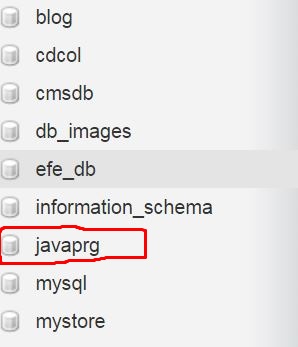
Step 2 : Choose The Database You Want to Duplicate

mysql database


Step 3 : Click On Operations

phpmyadmin operations


Step 4 : Go To " Copy database to: " Enter A Name For The Duplicated Database And Click Go
clone mysql database


Java And MySQL - How To Order JTable Data Using Java

JAVA & MySQL Code - Ordering JTable Data In Java NetBeans

__________________________________________________________________________

In this java Tutorial we will learn How To Sort JTable Data Ascending And Descending By Column Name ('age' in this example) With  Java NetBeans And MySQL Database .
 .


Project Source Code:

// Create Class User
package JAVA_VIDEOS_TUTORIALS;

public class User {
    
    private int id;
    private String fname;
    private String lname;
    private int age;
    
    
    public User(int Id,String Fname,String Lname,int Age)
    {
        this.id = Id;
        this.fname = Fname;
        this.lname = Lname;
        this.age = Age;
    }
    
    public int getId()
    {
        return id;
    }
    
    public String getFname()
    {
        return fname;
    }
    
    public String getLname()
    {
        return lname;
    }
    
    public int getAge()
    {
        return age;
    }
}
// Creates new form Java_JTable_Order
package JAVA_VIDEOS_TUTORIALS;

import java.sql.Connection;
import java.sql.DriverManager;
import java.sql.ResultSet;
import java.sql.Statement;
import java.util.ArrayList;
import javax.swing.table.DefaultTableModel;

public class Java_JTable_Order extends javax.swing.JFrame {

    /**
     * Creates new form Java_JTable_Order
     */
    public Java_JTable_Order() {
        initComponents();

        showUsersInJTable(query);
    }

    String query = "SELECT * FROM users";
    
    // function to get the connection
    public Connection getConnection()
    {
        Connection con = null;
        try
        {
          con = DriverManager.getConnection("jdbc:mysql://localhost/test_db","root",""); 
        }catch(Exception ex)
        {
            System.out.println(ex.getMessage());
        }
        return con;
    }
    
    // function return an arraylist of users
    public ArrayList<User> ListUsers(String query)
    {
        ArrayList<User> usersList = new ArrayList<User>();
        Connection con = getConnection();
        Statement st;
        ResultSet rs;
        try{
            st = con.createStatement();
            rs = st.executeQuery(query);
            User user;
            while(rs.next())
            {
                user = new User(
                              rs.getInt("id"),
                              rs.getString("fname"),
                              rs.getString("lname"),
                              rs.getInt("age")
                               );
                usersList.add(user);
            }
        }catch(Exception ex)
        {
            System.out.println(ex.getMessage());
        }
        
        return usersList;
        
    }
    
    
    // function to display the result in jtable
    public void showUsersInJTable(String OrderQuery)
    {
        ArrayList<User> users = ListUsers(OrderQuery);
        DefaultTableModel model = new DefaultTableModel();
        model.setColumnIdentifiers(new Object[]{"ID","First Name","Last Name","Age"});
        Object[] row = new Object[4];
        
        for(int i = 0; i < users.size(); i++)
        {
            row[0] = users.get(i).getId();
            row[1] = users.get(i).getFname();
            row[2] = users.get(i).getLname();
            row[3] = users.get(i).getAge();
            
            model.addRow(row);
        }
        
        jTable_Order.setModel(model);
    }


    /**
     * This method is called from within the constructor to initialize the form.
     * WARNING: Do NOT modify this code. The content of this method is always
     * regenerated by the Form Editor.
     */
    @SuppressWarnings("unchecked")
    // <editor-fold defaultstate="collapsed" desc="Generated Code">                          
    private void initComponents() {

        jButton_ASC = new javax.swing.JButton();
        jButton_DESC = new javax.swing.JButton();
        jScrollPane1 = new javax.swing.JScrollPane();
        jTable_Order = new javax.swing.JTable();

        setDefaultCloseOperation(javax.swing.WindowConstants.EXIT_ON_CLOSE);

        jButton_ASC.setText("ASCENDING");
        jButton_ASC.addActionListener(new java.awt.event.ActionListener() {
            public void actionPerformed(java.awt.event.ActionEvent evt) {
                jButton_ASCActionPerformed(evt);
            }
        });

        jButton_DESC.setText("DESCENDING");
        jButton_DESC.addActionListener(new java.awt.event.ActionListener() {
            public void actionPerformed(java.awt.event.ActionEvent evt) {
                jButton_DESCActionPerformed(evt);
            }
        });

        jTable_Order.setModel(new javax.swing.table.DefaultTableModel(
            new Object [][] {
                {null, null, null, null},
                {null, null, null, null},
                {null, null, null, null},
                {null, null, null, null}
            },
            new String [] {
                "Title 1", "Title 2", "Title 3", "Title 4"
            }
        ));
        jScrollPane1.setViewportView(jTable_Order);

        javax.swing.GroupLayout layout = new javax.swing.GroupLayout(getContentPane());
        getContentPane().setLayout(layout);
        layout.setHorizontalGroup(
            layout.createParallelGroup(javax.swing.GroupLayout.Alignment.LEADING)
            .addGroup(layout.createSequentialGroup()
                .addComponent(jButton_ASC)
                .addPreferredGap(javax.swing.LayoutStyle.ComponentPlacement.RELATED, javax.swing.GroupLayout.DEFAULT_SIZE, Short.MAX_VALUE)
                .addComponent(jButton_DESC))
            .addGroup(javax.swing.GroupLayout.Alignment.TRAILING, layout.createSequentialGroup()
                .addContainerGap(javax.swing.GroupLayout.DEFAULT_SIZE, Short.MAX_VALUE)
                .addComponent(jScrollPane1, javax.swing.GroupLayout.PREFERRED_SIZE, javax.swing.GroupLayout.DEFAULT_SIZE, javax.swing.GroupLayout.PREFERRED_SIZE)
                .addContainerGap())
        );
        layout.setVerticalGroup(
            layout.createParallelGroup(javax.swing.GroupLayout.Alignment.LEADING)
            .addGroup(layout.createSequentialGroup()
                .addGroup(layout.createParallelGroup(javax.swing.GroupLayout.Alignment.BASELINE)
                    .addComponent(jButton_ASC)
                    .addComponent(jButton_DESC))
                .addGap(27, 27, 27)
                .addComponent(jScrollPane1, javax.swing.GroupLayout.PREFERRED_SIZE, 459, javax.swing.GroupLayout.PREFERRED_SIZE)
                .addGap(0, 17, Short.MAX_VALUE))
        );

        pack();
    }// </editor-fold>                        
// button ascending
 private void jButton_ASCActionPerformed(java.awt.event.ActionEvent evt)
 {                                            
        // TODO add your handling code here:
        
        query = "SELECT * FROM users ORDER BY age ASC";
        showUsersInJTable(query);
    }                                           
// button descending
private void jButton_DESCActionPerformed(java.awt.event.ActionEvent evt) { // TODO add your handling code here: query = "SELECT * FROM users ORDER BY age DESC"; showUsersInJTable(query); } /** * @param args the command line arguments */ public static void main(String args[]) { try { for (javax.swing.UIManager.LookAndFeelInfo info : javax.swing.UIManager.getInstalledLookAndFeels()) { if ("Nimbus".equals(info.getName())) { javax.swing.UIManager.setLookAndFeel(info.getClassName()); break; } } } catch (ClassNotFoundException ex) { java.util.logging.Logger.getLogger(Java_JTable_Order.class.getName()).log(java.util.logging.Level.SEVERE, null, ex); } catch (InstantiationException ex) { java.util.logging.Logger.getLogger(Java_JTable_Order.class.getName()).log(java.util.logging.Level.SEVERE, null, ex); } catch (IllegalAccessException ex) { java.util.logging.Logger.getLogger(Java_JTable_Order.class.getName()).log(java.util.logging.Level.SEVERE, null, ex); } catch (javax.swing.UnsupportedLookAndFeelException ex) { java.util.logging.Logger.getLogger(Java_JTable_Order.class.getName()).log(java.util.logging.Level.SEVERE, null, ex); } //</editor-fold> /* Create and display the form */ java.awt.EventQueue.invokeLater(new Runnable() { public void run() { new Java_JTable_Order().setVisible(true); } }); } // Variables declaration - do not modify private javax.swing.JButton jButton_ASC; private javax.swing.JButton jButton_DESC; private javax.swing.JScrollPane jScrollPane1; private javax.swing.JTable jTable_Order; // End of variables declaration }
// OUTPUT:
jtable default order
jtable ascending order

jtable descending order
jtable ascending order


Php Code : How To Show Images From A Folder

Php Code: How To Display Images From A Folder Using Php

________________________________________________________


In this Php Tutorial we will Learn How To Get And Display Only Images From A Directory Using Php .

I Use In This Tutorial:
- NetBeans IDE .
- XAMPP .


Php Source Code:

<?php

$dir_path = "folder/";
$extensions_array = array('jpg','png','jpeg');

if(is_dir($dir_path))
{
    $files = scandir($dir_path);
    
    for($i = 0; $i < count($files); $i++)
    {
        if($files[$i] !='.' && $files[$i] !='..')
        {
            // get file name
            echo "File Name -> $files[$i]<br>";
            
            // get file extension
            $file = pathinfo($files[$i]);
            $extension = $file['extension'];
            echo "File Extension-> $extension<br>";
            
           // check file extension
            if(in_array($extension, $extensions_array))
            {
            // show image
            echo "<img src='$dir_path$files[$i]' style='width:100px;height:100px;'><br>";
            }
        }
    }
}


php show image


Php : How To Get Image Size From Directory Using Php

Php Code: How To Show Image Width And Height From A Folder Using Php

________________________________________________________


In this Php Tutorial we will Learn How  To Get And Display Images size ( width & height) From Folder Using Php .

I Use In This Tutorial:
- NetBeans IDE .
- XAMPP .


Php Source Code:

<?php

$dir_path = "images/";

if(is_dir($dir_path))
{
    $files = scandir($dir_path);
    
    for($i = 0; $i < count($files); $i++)
    {
        if($files[$i] != '.' && $files[$i] != '..')
        {
            echo "File Name -> $files[$i]<br>";
            
            $imageSize = getimagesize("$dir_path$files[$i]");
            
            echo " -Image Width : $imageSize[0]<br>";

            echo " -Image Height : $imageSize[1]<br>";

            //jpg or png or gif .........
            echo " -Image Type : $imageSize[2]<br>";

            echo " -Image Width And Height: $imageSize[3]<br>";

            // display the images
            echo"<img src='$dir_path$files[$i]' style='width:100px;height:100px;'><br><br>";
        }
    }
}


php display images width and height


Php : How To Get File Extension From Directory Using Php

Php Code: How To Show Files Extension From A Folder Using Php

________________________________________________________


In this Php Tutorial we will Learn How  To Display Files Extensions From Folder Using Php .

I Use In This Tutorial:

- NetBeans IDE .
- XAMPP .


Php Source Code:

<?php

$dir_path = "folder/";

if(is_dir($dir_path))
{

    $files = scandir($dir_path);

    for($i = 0; $i < count($files); $i++)
    {

        if($files[$i] !='.' && $files[$i] != '..')
        {

            echo "File Name -> $files[$i]<br>";
            
            $file = pathinfo($files[$i]);

            $extension = $file['extension'];
           
            echo "File Extension -> $extension<br><br>";
        }
    }
}


php files extensions


C# And MySQL - How To Search Data In MySQL And Display It On DataGridView Using C#

C# Code - How To Filter Data In MySQL And Show It On DataGridView Using C#

__________________________________________________________________________

In This C# Tutorial We Will Learn How To  Find Data In MySQL Database With A 
Specific  Value From TextBox And Display The Result In DataGridView Using CSharp
Programming Language .


Source Code :

using System;
using System.Collections.Generic;
using System.ComponentModel;
using System.Data;
using System.Drawing;
using System.Linq;
using System.Text;
using System.Threading.Tasks;
using System.Windows.Forms;
using MySql.Data.MySqlClient;

namespace Csharp_And_MySQL
{
    public partial class Csharp_MySQL_Datagridview_Search : Form
    {
        MySqlConnection connection = new MySqlConnection("datasource = localhost;port = 3306; Initial Catalog = 'test_db'; username = root; password=");
        MySqlCommand command;
        MySqlDataAdapter adapter;
        DataTable table;

        public Csharp_MySQL_Datagridview_Search()
        {
            InitializeComponent();
        }

        private void Csharp_MySQL_Datagridview_Search_Load(object sender, EventArgs e)
        {
            searchData("");
        }

        public void searchData(string valueToSearch)
        {
            string query = "SELECT * FROM users WHERE CONCAT(`id`, `fname`, `lname`, `age`) like '%"+valueToSearch+"%'";
            command = new MySqlCommand(query, connection);
            adapter = new MySqlDataAdapter(command);
            table = new DataTable();
            adapter.Fill(table);
            dataGridView1.DataSource = table;
        }

        private void BTN_SEARCH_Click(object sender, EventArgs e)
        {
            string valueToSearch = textBoxValueToSearch.Text.ToString();
            searchData(valueToSearch);
        }

    }
}


=> OUTPUT:

c# datagridview filter