Affichage des articles dont le libellé est update. Afficher tous les articles

Java Update MySQL Data Using JTable

How To Update All MySQL DataBase Values Using JTable In Java NetBeans

update mysql data using jtable in java


In this Java Tutorial we will see How To UPDATE DataBase Data With JTable Rows Values Using For Loop And addBatch Function On Button Click In Java NetBeans .


Project Source Code:


// function to get the connection
    public Connection getConnection()
    {
         try {
            Class.forName("com.mysql.jdbc.Driver");
        } catch (ClassNotFoundException ex) {
             System.out.println(ex.getMessage());
        }
        
        Connection con = null;
        
        try {
            con = DriverManager.getConnection("jdbc:mysql://localhost/s_t_d", "root", "");
        } catch (SQLException ex) {
            System.out.println(ex.getMessage());
        }
        return con;
    }

// function to display data from mysql to Jtable 
    public void fillTable(){
        Connection con = getConnection();
        Statement ps;
        ResultSet rs;
        DefaultTableModel model = (DefaultTableModel) jTable1.getModel();
        try {
            ps = con.createStatement();
            rs = ps.executeQuery("SELECT * FROM `student`");

            while(rs.next()){// Id`, `FullName`, `Address`, `BirthDate
                Object[] row = new Object[jTable1.getColumnCount()];
                row[0] = rs.getInt("Id");
                row[1] = rs.getString("FullName");
                row[2] = rs.getString("Address");
                row[3] = rs.getString("BirthDate");
                model.addRow(row);
            }
        } catch (SQLException ex) {
            System.out.println(ex.getMessage());
        }
    }


// button update
private void jButtonUPdateAllActionPerformed(java.awt.event.ActionEvent evt) {                                                 
        Connection con = getConnection();
        Statement st;
        DefaultTableModel model = (DefaultTableModel) jTable1.getModel();
        
        try {
            st = con.createStatement();
            for(int i = 0; i < model.getRowCount(); i++){
                
                int id = Integer.valueOf(model.getValueAt(i, 0).toString());
                String fn = model.getValueAt(i,1).toString();
                String adr = model.getValueAt(i,2).toString();
                String bdate = model.getValueAt(i,3).toString();
                
                String updateQuery = "UPDATE `student` SET `FullName`='"+fn+"',`Address`='"+adr+"',`BirthDate`='"+bdate+"' WHERE `Id` = " +id;
              
                st.addBatch(updateQuery);
            }
            
            int[] updatedRow = st.executeBatch();
            System.out.println(updatedRow.length);
            
        } catch (SQLException ex) {
            Logger.getLogger(Update_All_MySQL_Data_Using_JTable.class.getName()).log(Level.SEVERE, null, ex);
        }
        
    }

OutPut:
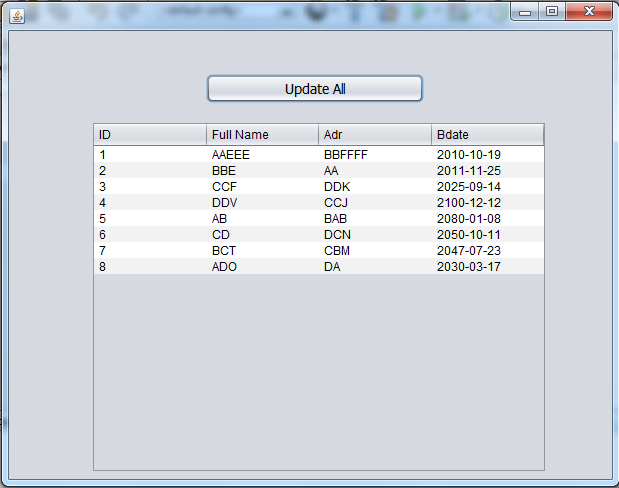
Editing mysql data using jtable using java


VB.Net Update Image In MySQL

How To Edit An Image In MySQL Database Using VbNet

Update An Image In MySQL Using VB.Net

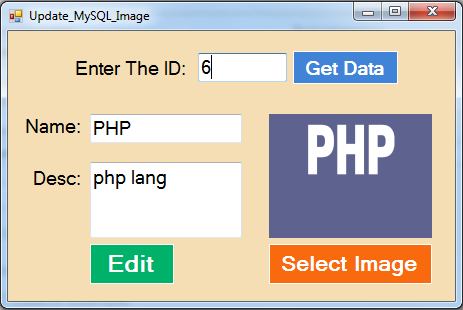
In This VB.Net Tutorial  We Will See How To Browse Picture On Button Click And Display The Selected Picture Into A PictureBox And Insert The Image From PictureBox Into MySQL DataBase Table Using MySqlCommand With Parameters In Visual Basic.Net  Programming Language And Visual Studio Editor.


Project Source Code:

Imports MySql.Data.MySqlClient
Imports System.IO

Public Class Update_MySQL_Image

    Dim connection As New MySqlConnection("datasource=localhost;port=3306;username=root;password=;database=s_t_d")

    ' display image from mysql into picturebox 
    Private Sub ButtonShow_Click(sender As Object, e As EventArgs) Handles ButtonShow.Click

        Dim command As New MySqlCommand("SELECT `id`, `name`, `dscp`, `pic` FROM `mypics` WHERE `id` = @ID", connection)
        command.Parameters.Add("@ID", MySqlDbType.UInt64).Value = TextBoxID.Text

        Dim adapter As New MySqlDataAdapter(command)
        Dim table As New DataTable()


        Try

            adapter.Fill(table)

            Dim imgByte() As Byte

            If table.Rows.Count = 1 Then

                TextBoxName.Text = table(0)(1)
                TextBoxDesc.Text = table(0)(2)
                imgByte = table(0)(3)

                Dim ms As New MemoryStream(imgByte)
                PictureBox1.Image = Image.FromStream(ms)

            Else

                MessageBox.Show("No Data Found")

                TextBoxName.Text = ""
                TextBoxDesc.Text = ""

                PictureBox1.Image = Nothing

            End If

        Catch ex As Exception

            MessageBox.Show("ERROR")

            TextBoxName.Text = ""
            TextBoxDesc.Text = ""

            PictureBox1.Image = Nothing

        End Try

    End Sub

    ' button browse image and display it into picturebox 
    Private Sub ButtonSelect_Img_Click(sender As Object, e As EventArgs) Handles ButtonSelect_Img.Click

        Dim opf As New OpenFileDialog

        opf.Filter = "Choose Image(*.JPG;*.PNG;*.GIF)|*.jpg;*.png;*.gif"

        If opf.ShowDialog = Windows.Forms.DialogResult.OK Then

            PictureBox1.Image = Image.FromFile(opf.FileName)

        End If

    End Sub

    ' button edit image and other data 
    Private Sub ButtonEDIT_Click(sender As Object, e As EventArgs) Handles ButtonEDIT.Click

        Dim update_command As New MySqlCommand("UPDATE `mypics` SET `name`=@nm,`dscp`=@dc,`pic`=@img WHERE `id` = @ID", connection)

        Dim ms As New MemoryStream

        PictureBox1.Image.Save(ms, PictureBox1.Image.RawFormat)

        update_command.Parameters.Add("@nm", MySqlDbType.VarChar).Value = TextBoxName.Text
        update_command.Parameters.Add("@dc", MySqlDbType.VarChar).Value = TextBoxDesc.Text
        update_command.Parameters.Add("@ID", MySqlDbType.Int64).Value = TextBoxID.Text
        update_command.Parameters.Add("@img", MySqlDbType.Blob).Value = ms.ToArray()

        connection.Open()

        If update_command.ExecuteNonQuery() = 1 Then
            MessageBox.Show("UPDATED")
        Else
            MessageBox.Show("NOT UPDATED")
        End If

        connection.Close()

    End Sub
End Class
      
///////////////OUTPUT:

Update Image In MySQL Using Visual Basic.Net


VB.Net And MySQL DataBase - INSERT UPDATE DELETE SEARCH

VB.NET - How To Insert Update Search Delete Data From MySQL Using Visual Basic.Net

vb.net and mysql add edit remove find

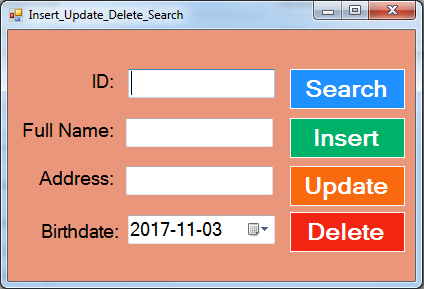
In This VB.Net Tutorial  We Will See How To: 
 - Insert Data Into MySQL Database Table.
 - Update Data From MySQL Database Table With A Specific ID.
 Delete Data From MySQL Database Table With A Specific ID.
 - Search Data In MySQL Database With A Specific ID And Display The Information Into TextBoxes And DateTimePicker ( if data exists )
Using Visual Basic.Net  Programming Language And Visual Studio Editor.


Part 1


Part 2


Project Source Code:

Imports MySql.Data.MySqlClient

Public Class Insert_Update_Delete_Search

    Dim connection As New MySqlConnection("datasource=localhost;port=3306;username=root;password=;database=s_t_d")

    ' button find 
    Private Sub ButtonSearch_Click(sender As Object, e As EventArgs) Handles ButtonSearch.Click

        Dim search_command As New MySqlCommand("SELECT * FROM `student` WHERE `Id` = @id", connection)

        search_command.Parameters.Add("@id", MySqlDbType.Int64).Value = TextBox1.Text

        Dim adapter As New MySqlDataAdapter(search_command)

        Dim table As New DataTable()

        Try

            adapter.Fill(table)

            If table.Rows.Count > 0 Then

                TextBox2.Text = table(0)(1)
                TextBox3.Text = table(0)(2)
                DateTimePicker1.Value = table(0)(3)

            Else

                TextBox2.Text = ""
                TextBox3.Text = ""
                DateTimePicker1.Value = Now()
                MessageBox.Show("No Data Found")

            End If

        Catch ex As Exception

            MessageBox.Show("ERROR")

        End Try

    End Sub

      ' function to execute the insert update delete commands 
    Function execCommand(ByVal cmd As MySqlCommand) As Boolean

        If connection.State = ConnectionState.Closed Then
            connection.Open()
        End If

        Try
            If cmd.ExecuteNonQuery() = 1 Then
                Return True

            Else
                Return False
            End If
        Catch ex As Exception

            MessageBox.Show("ERROR")
            Return False

        End Try

        If connection.State = ConnectionState.Open Then
            connection.Close()
        End If

    End Function

    ' button add 
    Private Sub ButtonInsert_Click(sender As Object, e As EventArgs) Handles ButtonInsert.Click

        Dim insert_command As New MySqlCommand("INSERT INTO `student`(`FullName`, `Address`, `BirthDate`) VALUES (@fln,@adds,@brd)", connection)
        insert_command.Parameters.Add("@fln", MySqlDbType.VarChar).Value = TextBox2.Text
        insert_command.Parameters.Add("@adds", MySqlDbType.VarChar).Value = TextBox3.Text
        insert_command.Parameters.Add("@brd", MySqlDbType.Date).Value = DateTimePicker1.Value

        If execCommand(insert_command) Then
            MessageBox.Show("Data Inserted")

        Else
            MessageBox.Show("Data NOT Inserted")
        End If

    End Sub

    ' button edit 
    Private Sub ButtonUpdate_Click(sender As Object, e As EventArgs) Handles ButtonUpdate.Click

        Dim update_command As New MySqlCommand("UPDATE `student` SET `FullName`=@fln,`Address`=@adds,`BirthDate`=@brd WHERE `Id` = @id", connection)
        update_command.Parameters.Add("@id", MySqlDbType.Int64).Value = TextBox1.Text
        update_command.Parameters.Add("@fln", MySqlDbType.VarChar).Value = TextBox2.Text
        update_command.Parameters.Add("@adds", MySqlDbType.VarChar).Value = TextBox3.Text
        update_command.Parameters.Add("@brd", MySqlDbType.Date).Value = DateTimePicker1.Value

        If execCommand(update_command) Then
            MessageBox.Show("Data Updated")

        Else
            MessageBox.Show("Data NOT Updated")
        End If

    End Sub

    ' button remove 
    Private Sub ButtonDelete_Click(sender As Object, e As EventArgs) Handles ButtonDelete.Click

        Dim delete_command As New MySqlCommand("DELETE FROM `student` WHERE `Id` = @id", connection)
        delete_command.Parameters.Add("@id", MySqlDbType.Int64).Value = TextBox1.Text

        If execCommand(delete_command) Then
            MessageBox.Show("Data Deleted")

        Else
            MessageBox.Show("Data NOT Deleted")
        End If

    End Sub
End Class

///////////////OUTPUT:

Add Edit Find Remove Data From MySQL Database In Visual Basic.Net


VB.Net Update MySQL Data

How To Edit Data In MySQL Database Using VbNet

VB.Net Update MySQL Database Data

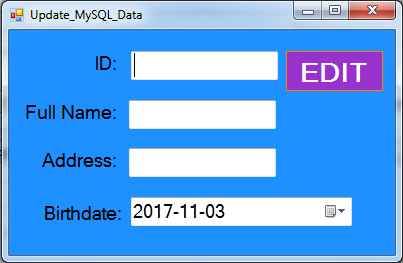
In This VB.Net Tutorial  We Will See How To Get Data From TextBoxes And DateTimePicker  And Update The Selected Data From MySQL DataBase Table Using ID To Just Edit The Data With This Specific ID Using MySqlCommand With Parameters In Visual Basic.Net  Programming Language And Visual Studio Editor.


Project Source Code:

Imports MySql.Data.MySqlClient

Public Class Update_MySQL_Data

    Dim connection As New MySqlConnection("datasource=localhost;port=3306;username=root;password=;database=s_t_d")

    Private Sub ButtonInsert_Click(sender As Object, e As EventArgs) Handles ButtonInsert.Click

        Dim command As New MySqlCommand("UPDATE `student` SET `FullName`=@fn,`Address`=@adds,`BirthDate`=@brd WHERE `Id` =@id", connection)

        command.Parameters.Add("@id", MySqlDbType.Int64).Value = TextBox1.Text
        command.Parameters.Add("@fn", MySqlDbType.VarChar).Value = TextBox2.Text
        command.Parameters.Add("@adds", MySqlDbType.VarChar).Value = TextBox3.Text
        command.Parameters.Add("@brd", MySqlDbType.Date).Value = DateTimePicker1.Value

        connection.Open()

        If command.ExecuteNonQuery() = 1 Then

            MessageBox.Show("Data Updated")

        Else

            MessageBox.Show("ERROR")

        End If

        connection.Close()

    End Sub
End Class
      
///////////////OUTPUT:

Update MySQL Data In VBnet


VB.Net And SQL DataBase - INSERT UPDATE DELETE

VB.NET - How To Insert Update Delete Data From SQL Server Using Visual Basic.Net


In This VB.NET Tutorial We Will See How To Create Buttons To Insert Data Into SqLServer, Update SqLServer Data, Delete Records From SQLServer Using Visual Basic .NET Programming Language And Microsoft SQL DataBase.


Project Source Code:

Imports System.Data.SqlClient

Public Class VBNET_SQL_Insert_Update_Delete

    Dim connection As New SqlConnection("Server= SAMSNG-PC; Database = TestDB; Integrated Security = true")

    Private Sub BTN_INSERT_Click(sender As Object, e As EventArgs) Handles BTN_INSERT.Click

        Dim insertQuery As String = "INSERT INTO Users (Fname,Lname,age) VALUES('" & TextBoxFN.Text & "','" & TextBoxLN.Text & "'," & TextBoxAGE.Text & ")"

        ExecuteQuery(insertQuery)

        MessageBox.Show("Data Inserted")

    End Sub

    Public Sub ExecuteQuery(query As String)

        Dim command As New SqlCommand(query, connection)

        connection.Open()

        command.ExecuteNonQuery()

        connection.Close()

    End Sub

    Private Sub BTN_UPDATE_Click(sender As Object, e As EventArgs) Handles BTN_UPDATE.Click

        Dim updateQuery As String = "Update Users Set Fname = '" & TextBoxFN.Text & "' ,Lname = '" & TextBoxLN.Text & "',age = " & TextBoxAGE.Text & " WHERE Id =" & TextBoxID.Text & ""
        ExecuteQuery(updateQuery)
        MessageBox.Show("Data Updated")

    End Sub

    Private Sub BTN_DELETE_Click(sender As Object, e As EventArgs) Handles BTN_DELETE.Click

        Dim deleteQuery As String = "delete from Users Where Id = " & TextBoxID.Text
        ExecuteQuery(deleteQuery)
        MessageBox.Show("User deleted")

    End Sub
End Class

///////////////OUTPUT:

vb.net and sql insert update delete