Affichage des articles dont le libellé est jMenuItem. Afficher tous les articles

Java Create Menu Using MySQL

How To Create A Menu With MySQL DataBase Using Java NetBeans

create menu from database using java


In this Java Tutorial we will see How To Create A Menu Using MySQL DataBase By Creating JMenu And JmenItems Dynamically From Database With Images And Text In Java NetBeans .


Project Source Code:


// function to get the connection
    public Connection getConnection()
    {
         try {
            Class.forName("com.mysql.jdbc.Driver");
        } catch (ClassNotFoundException ex) {
             System.out.println(ex.getMessage());
        }
        
        Connection con = null;
        
        try {
            con = DriverManager.getConnection("jdbc:mysql://localhost/s_t_d", "root", "");
        } catch (SQLException ex) {
            System.out.println(ex.getMessage());
        }
        return con;
    }
    
// Create And Add JMenu To JMenuBar
    public void _addMenu(){
      
        Connection con = getConnection();
        Statement st;
        ResultSet rs;
        
        try {
            st = con.createStatement();
            rs = st.executeQuery("SELECT * FROM `mypics`");
            
            while(rs.next()){
                ImageIcon img1 = new ImageIcon(rs.getBytes("pic"));
                Image img2 = img1.getImage().getScaledInstance(70, 70, Image.SCALE_SMOOTH);
                ImageIcon img3 = new ImageIcon(img2);
                
                // create new jmenu
                JMenu jm = new JMenu(rs.getString("name"));
                jm.setIcon(img3);
               // add jmenuitems to the jmenu
                _addMenuItem(jm, rs.getInt("id"));
                jMenuBar1.add(jm);
            }
        } catch (SQLException ex) {
            Logger.getLogger(menu_from_mysql.class.getName()).log(Level.SEVERE, null, ex);
        }
       
    }
    
// function to add JmenuITems to Jmenu
    public void _addMenuItem(JMenu jm, int id){
     
        Connection con = getConnection();
        Statement st;
        ResultSet rs;
        
        try {
            st = con.createStatement();
            rs = st.executeQuery("SELECT * FROM `pics2` WHERE idMyPics = "+id);
            
            while(rs.next()){
                ImageIcon img1 = new ImageIcon(rs.getBytes("pic"));
                Image img2 = img1.getImage().getScaledInstance(50, 50, Image.SCALE_SMOOTH);
                ImageIcon img3 = new ImageIcon(img2);
                
                JMenuItem jmi = new JMenuItem(rs.getString("name"),img3);
                jm.add(jmi);
            }
        } catch (SQLException ex) {
            Logger.getLogger(menu_from_mysql.class.getName()).log(Level.SEVERE, null, ex);
        }
        
    } 

OutPut:

Java Menu Using DataBase


Java - jMenuBar,jMenu,jMenuItem,JSeparator

How To Use MenuBar, Menu, MenuItem, Separator In Java NetBeans

java MenuBar, Menu, MenuItem, Separator


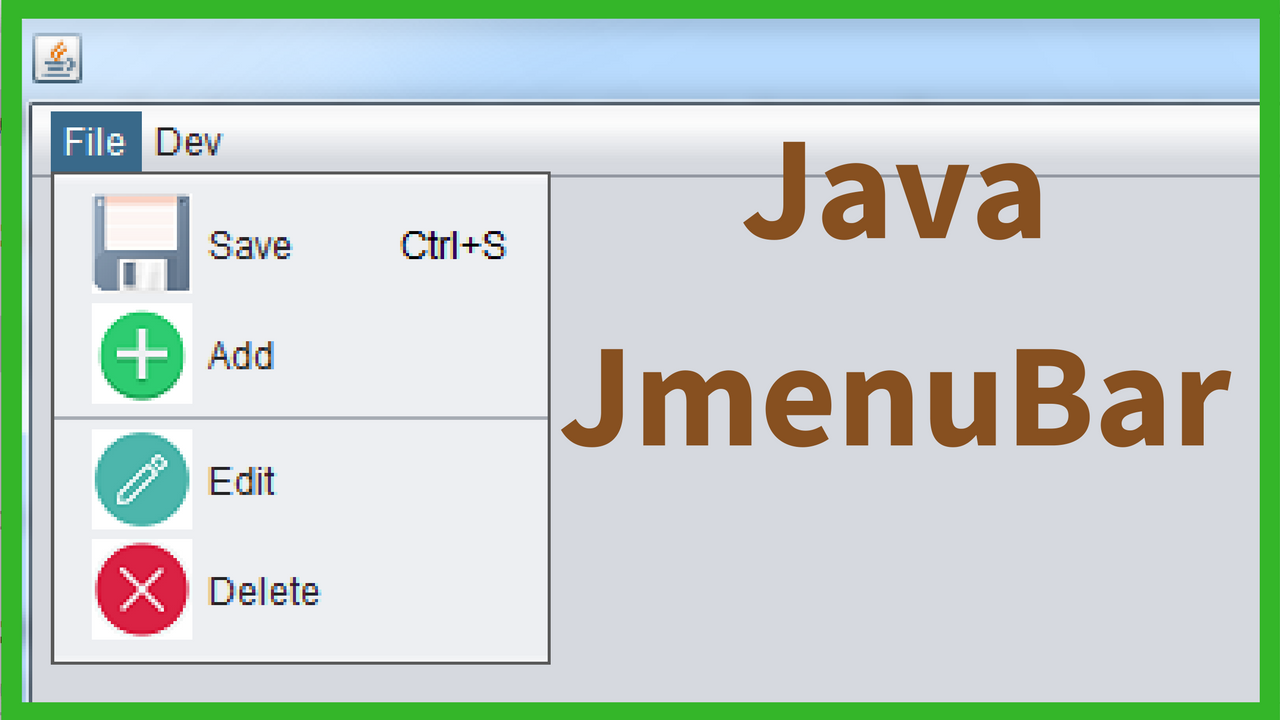
In this Java Tutorial we will see How To Add And Use JMenuBar, JMenu, JMenuItem, 
JSeparator In Java NetBeans .


Project Source Code:

package javaapplication1;

/**
 *
 * @author 1BestCsharp
 */
public class Java_MenuBar extends javax.swing.JFrame {

    /**
     * Creates new form Java_MenuBar
     */
    public Java_MenuBar() {
        initComponents();
    }

    /**
     * This method is called from within the constructor to initialize the form.
     * WARNING: Do NOT modify this code. The content of this method is always
     * regenerated by the Form Editor.
     */
    @SuppressWarnings("unchecked")
    // <editor-fold defaultstate="collapsed" desc="Generated Code">                          
    private void initComponents() {

        jMenuBar1 = new javax.swing.JMenuBar();
        jMenu3 = new javax.swing.JMenu();
        jMenuItem1 = new javax.swing.JMenuItem();
        jMenuItem3 = new javax.swing.JMenuItem();
        jSeparator1 = new javax.swing.JPopupMenu.Separator();
        jMenuItem2 = new javax.swing.JMenuItem();
        jMenuItem_Save = new javax.swing.JMenuItem();
        jMenu1 = new javax.swing.JMenu();

        setDefaultCloseOperation(javax.swing.WindowConstants.EXIT_ON_CLOSE);

        jMenu3.setText("File");

        jMenuItem1.setAccelerator(javax.swing.KeyStroke.getKeyStroke(java.awt.event.KeyEvent.VK_S, java.awt.event.InputEvent.CTRL_MASK));
        jMenuItem1.setIcon(new javax.swing.ImageIcon(getClass().getResource("/images/save.png"))); // NOI18N
        jMenuItem1.setText("Save");
        jMenuItem1.addActionListener(new java.awt.event.ActionListener() {
            public void actionPerformed(java.awt.event.ActionEvent evt) {
                jMenuItem1ActionPerformed(evt);
            }
        });
        jMenu3.add(jMenuItem1);

        jMenuItem3.setIcon(new javax.swing.ImageIcon(getClass().getResource("/images/add.png"))); // NOI18N
        jMenuItem3.setText("Add");
        jMenu3.add(jMenuItem3);
        jMenu3.add(jSeparator1);

        jMenuItem2.setIcon(new javax.swing.ImageIcon(getClass().getResource("/images/edit.png"))); // NOI18N
        jMenuItem2.setText("Edit");
        jMenu3.add(jMenuItem2);

        jMenuItem_Save.setIcon(new javax.swing.ImageIcon(getClass().getResource("/images/close.png"))); // NOI18N
        jMenuItem_Save.setText("Delete");
        jMenu3.add(jMenuItem_Save);

        jMenuBar1.add(jMenu3);

        jMenu1.setText("Dev");
        jMenuBar1.add(jMenu1);

        setJMenuBar(jMenuBar1);

        javax.swing.GroupLayout layout = new javax.swing.GroupLayout(getContentPane());
        getContentPane().setLayout(layout);
        layout.setHorizontalGroup(
            layout.createParallelGroup(javax.swing.GroupLayout.Alignment.LEADING)
            .addGap(0, 616, Short.MAX_VALUE)
        );
        layout.setVerticalGroup(
            layout.createParallelGroup(javax.swing.GroupLayout.Alignment.LEADING)
            .addGap(0, 398, Short.MAX_VALUE)
        );

        pack();
    }// </editor-fold>                        

    private void jMenuItem1ActionPerformed(java.awt.event.ActionEvent evt) {                                           
        
        System.out.println("Save");
        
    }                                          

    /**
     * @param args the command line arguments
     */
    public static void main(String args[]) {
        /* Set the Nimbus look and feel */
        //<editor-fold defaultstate="collapsed" desc=" Look and feel setting code (optional) ">
        /* If Nimbus (introduced in Java SE 6) is not available, stay with the default look and feel.
         * For details see http://download.oracle.com/javase/tutorial/uiswing/lookandfeel/plaf.html 
         */
        try {
            for (javax.swing.UIManager.LookAndFeelInfo info : javax.swing.UIManager.getInstalledLookAndFeels()) {
                if ("Nimbus".equals(info.getName())) {
                    javax.swing.UIManager.setLookAndFeel(info.getClassName());
                    break;
                }
            }
        } catch (ClassNotFoundException ex) {
            java.util.logging.Logger.getLogger(Java_MenuBar.class.getName()).log(java.util.logging.Level.SEVERE, null, ex);
        } catch (InstantiationException ex) {
            java.util.logging.Logger.getLogger(Java_MenuBar.class.getName()).log(java.util.logging.Level.SEVERE, null, ex);
        } catch (IllegalAccessException ex) {
            java.util.logging.Logger.getLogger(Java_MenuBar.class.getName()).log(java.util.logging.Level.SEVERE, null, ex);
        } catch (javax.swing.UnsupportedLookAndFeelException ex) {
            java.util.logging.Logger.getLogger(Java_MenuBar.class.getName()).log(java.util.logging.Level.SEVERE, null, ex);
        }
        //</editor-fold>

        /* Create and display the form */
        java.awt.EventQueue.invokeLater(new Runnable() {
            public void run() {
                new Java_MenuBar().setVisible(true);
            }
        });
    }

    // Variables declaration - do not modify                     
    private javax.swing.JMenu jMenu1;
    private javax.swing.JMenu jMenu3;
    private javax.swing.JMenuBar jMenuBar1;
    private javax.swing.JMenuItem jMenuItem1;
    private javax.swing.JMenuItem jMenuItem2;
    private javax.swing.JMenuItem jMenuItem3;
    private javax.swing.JMenuItem jMenuItem_Save;
    private javax.swing.JPopupMenu.Separator jSeparator1;
    // End of variables declaration                   
}


///////////////OUTPUT:


Netbeans Using MenuBar, Menu, MenuItem, Separator