Affichage des articles dont le libellé est Javascript Input Text. Afficher tous les articles

Javascript Input Text Allow Only Alphabet

How To Make An Input Text Accept Only Alphabet Values Using Javascript  

input text accept only letter characters input using js


In this Javascript tutorial, we will see how to create an input text field that only allows letter characters to be entered during the 'keypress' event.
We will accomplish this by using the 'test' function in JS and Netbeans editor .


Project Source Code:


<!DOCTYPE html>
<html>
    <head>
        <title>TODO supply a title</title>
        <meta charset="windows-1252">
        <meta name="viewport" content="width=device-width, initial-scale=1.0">
    </head>
    <body>
        
        <input type="text" onkeydown="isInputLetter(event)">
        
        <script>
            
            function isInputLetter(evt){
                var ch = String.fromCharCode(evt.which);
                
                if(!(/[a-zA-Z]/.test(ch) || ch === " " || evt.keyCode === 8)){
                    evt.preventDefault();
                }
                 console.log(evt.keyCode);
                
            }
            
        </script>
        
    </body>
</html>


OUTPUT:


js input text allow only alphabet char

Javascript Input Text Allow Only Numbers

How To Make An Input Text Accept Only Numeric Values Using Javascript  

input text accept only numeric input using js


In This Javascript Tutorial we will See How To Create An Input Text That Allow Only Numbers On KeyPress Event Using test function using JS And Netbeans Editor .


Project Source Code:


<!DOCTYPE html>
<html>
    <head>
        <title>Javascript - Input Text Allow Only Numbers</title>
        <meta charset="windows-1252">
        <meta name="viewport" content="width=device-width, initial-scale=1.0">
    </head>
    <body>
        
        <input type="text" onkeypress="isInputNumber(event)">
        
        <script>
            
            function isInputNumber(evt){
                
                var ch = String.fromCharCode(evt.which);
                
                if(!(/[0-9]/.test(ch))){
                    evt.preventDefault();
                }
                
            }
            
        </script>
       
    </body>
</html>


OUTPUT:


js input text allow only numbers


JavaScript Get Selected LI Text

How To Get Selected LI Text To Input Text Using Javascript  

Get Selected <LI> Text In JS


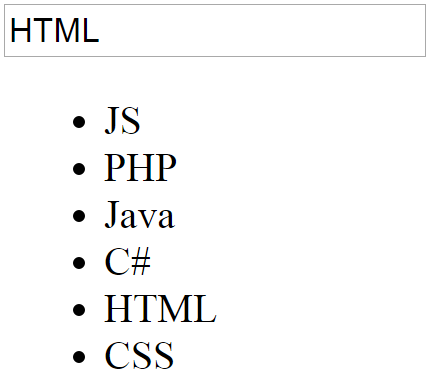
In This Javascript Tutorial we will See How To Get Display The Selected <li> Text Value From An <UL> List And Display The Value Into An Input Text On LI Item Click Event In JS And Netbeans Editor .


Project Source Code:

    
<!DOCTYPE html>
<html>
    <head>
        <title>Javascript: get selected li from ul</title>
        <meta charset="windows-1252">
        <meta name="viewport" content="width=device-width, initial-scale=1.0">
    </head>
    <body>
        
        <input type="text" id="txt">
        
        <ul id="list">
            <li>JS</li>
            <li>PHP</li>
            <li>Java</li>
            <li>C#</li>
            <li>HTML</li>
            <li>CSS</li>
        </ul>
        
        <script>
            
            var items = document.querySelectorAll("#list li");
            
            for(var i = 0; i < items.length; i++)
            {
                items[i].onclick = function(){
                    
                    document.getElementById("txt").value = this.innerHTML;
                    
                };
            }
            
        </script>
        
    </body>
</html>


OUTPUT:


display <li> text into input text in javascript


Javascript Add LI To UL

How To Add A New LI To UL From Input Text Using Javascript  

add a new li into ul using javascript


In This Javascript Tutorial we will See How To Insert A New <li> Element Into An Unordered List <ul> With Value From Text Input On Button Click using JS And Netbeans Editor .


Project Source Code:


<!DOCTYPE html>
<html>
    <head>
        <title>JavaScript: add LI to UL</title>
        <meta charset="windows-1252">
        <meta name="viewport" content="width=device-width, initial-scale=1.0">
    </head>
    <body>
        
        <input type="text" id="txtVal">
        <button onclick="addLi()">Add</button>
        
        <ul id="list">
            <li>1</li>
            <li>22</li>
            <li>50</li>
        </ul>
        
        <script>
            
            function addLi()
            {

                var txtVal = document.getElementById('txtVal').value,
                    listNode = document.getElementById('list'),
                    liNode = document.createElement("LI"),
                    txtNode = document.createTextNode(txtVal);
            
                 liNode.appendChild(txtNode);
                 listNode.appendChild(liNode);
            
            }
            
        </script>
       
    </body>
</html>


OUTPUT:


add li to ul from input text