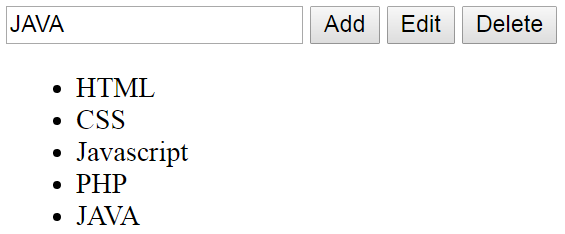
How To Add, Edit, Remove Selected LI Using Javascript

In This Javascript Tutorial we will See How To :
- Insert A New <LI> To A <UL> .
- Display The Selected <LI> From The List To Input Text .
- Update The Selected <LI> From The List Using Input Text .
- Remove The Selected <LI> From The List .
On 3 Button Click Event In JS And Netbeans Editor .
Project Source Code:
<!DOCTYPE html>
<html>
<head>
<title>Javascript: add edit delete LI</title>
<meta charset="windows-1252">
<meta name="viewport" content="width=device-width, initial-scale=1.0">
<style>
li{cursor: pointer}
</style>
</head>
<body>
<input type="text" id="txt">
<button onclick="addLI()">Add</button>
<button onclick="editLI()">Edit</button>
<button onclick="deleteLI()">Delete</button>
<ul id="list">
<li>HTML</li>
<li>CSS</li>
<li>Javascript</li>
<li>PHP</li>
</ul>
<script>
var inputText = document.getElementById("txt"),
items = document.querySelectorAll("#list li"),
tab = [], index;
// get the selected li index using array
// populate array with li values
for(var i = 0; i < items.length; i++){
tab.push(items[i].innerHTML);
}
// get li index onclick
for(var i = 0; i < items.length; i++){
items[i].onclick = function(){
index = tab.indexOf(this.innerHTML);
console.log(this.innerHTML + " INDEX = " + index);
// set the selected li value into input text
inputText.value = this.innerHTML;
};
}
function refreshArray()
{
// clear array
tab.length = 0;
items = document.querySelectorAll("#list li");
// fill array
for(var i = 0; i < items.length; i++){
tab.push(items[i].innerHTML);
}
}
function addLI(){
var listNode = document.getElementById("list"),
textNode = document.createTextNode(inputText.value),
liNode = document.createElement("LI");
liNode.appendChild(textNode);
listNode.appendChild(liNode);
refreshArray();
// add event to the new LI
liNode.onclick = function(){
index = tab.indexOf(liNode.innerHTML);
console.log(liNode.innerHTML + " INDEX = " + index);
// set the selected li value into input text
inputText.value = liNode.innerHTML;
};
}
function editLI(){
// edit the selected li using input text
items[index].innerHTML = inputText.value;
refreshArray();
}
function deleteLI(){
refreshArray();
if(items.length > 0){
items[index].parentNode.removeChild(items[index]);
inputText.value = "";
}
}
</script>
</body>
</html>
OUTPUT: